
infinix x yugatech

Samsung ATIV Q unveiled, runs Windows 8 & Android OS

Listen to article

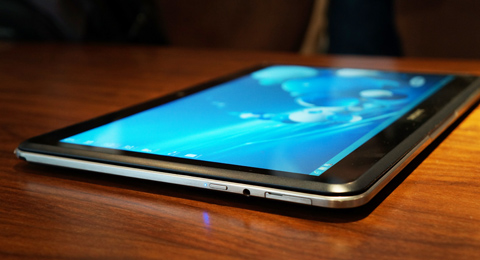
Samsung has introduced a hybrid ultrabook here in London for the 2013 Samsung Premiere launch. Called the Samsung ATIV Q, the device serves as book a Windows 8 ultrabook and a 13.3-inch Android Jellybean tablet.

First the ATIV Q can do dual-OS mode, Windows 8 and Android 4.2 Jellybean. However, based on our hands-on earlier, it seems that the device primarily boots via Windows 8 and then runs an instance of Android while on Windows environment (some sort of visualization). Thus, both operating system runs simultaneously.

The ATIV Q has 4 natural modes or positions — the tablet mode, the notebook mode, a floating mode which still has to find its natural use, and a stand which is similar to the notebook only that the screen is flipped and facing the back side.
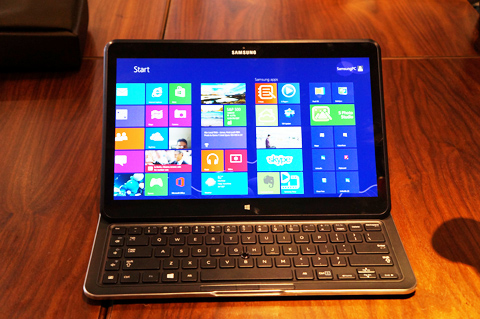
The device is very thin, measuring only 13.9mm on the side and the entire set only weighs about 1.29kg or 2.8 lbs.

The laptop is powered by the newest Intel Haswell chip, an ultra-low voltage Core i5 4200U at 1.6GHz dual-core (Turbo Boost up to 2.3GHz).
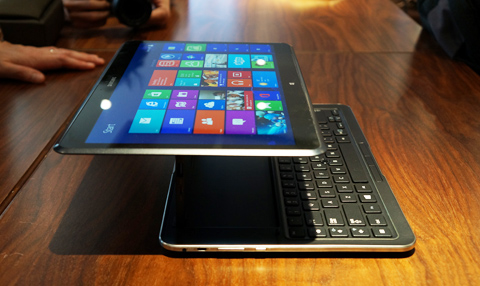
The rest of the hardware specifications are basically standard for an ultrabook — 4GB DDR3 RAM, 128GB SSD, WiFi and Bluetooth.

What we found impressive though is that the 13.3-inch display has one of the highest pixel density in an ultrabook — a resolution of 3200x1800pixels gives it a pixel density of 275ppi.
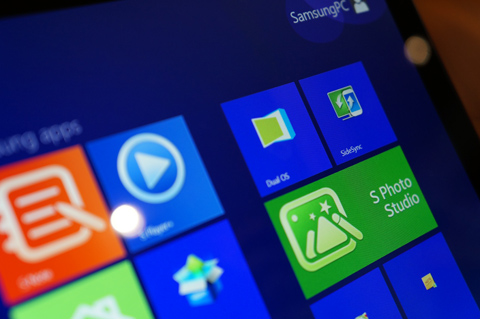
As mentioned earlier, the dual-OS mode is quite unique. Once you’ve booted into the Windows 8 OS, you will find a shortcut in Tiles that says “Dual OS”. Clicking this shortcut rbings you instantly into the Android OS.

To go back to Windows 8, either you swipe form the right corner of the touchscsreen or simply hit the Windows 8 logo button in the keyboard.
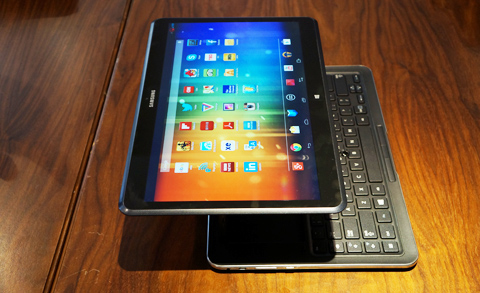
You can place links to apps from Android and place them in Windows as a Tile. When click the Tile shortcut, it switches to Android and runs/launches the app. Photos taken thru the Windows environment can also be transferred to the Android environment as well.

There’s also a Wacom pen/stylus so you can use it for drawing or sketching when needed. For navigation, there’s also the nipple/pointer mouse situated in the middle of the keyboard.
Here’s the most complete hardware configuration we’ve gotten so far.

Samsung ATIV Q specs:
13.3-inch WQHD display @ 3200×1800 pixels, 275ppi
Intel Core i5-4200U 1.6GHz dual-core
Turbo Boost up to 2.3GHz
4GB DDR3 RAM
128GB SSD storage
WiFi 802.11 b/g/n
Bluetooth 4.0
Windows 8
Android 4.2 Jellybean
13.9mm thin, 1.29kg weight

The processor and other hardware are housed inside the hinge so the heat is away from the keyboard and screen. Samsung promises battery life of up to 9 hours.

Samsung has indicated the ATIV Q will be released some time in the 3rd quarter of 2013 but no retail price yet.

React to this article:
Written by
Abe Olandres

Abe Olandres

Editor-in-chief

Abe is the founder and Editor-in-Chief of YugaTech with over 20 years of experience in the technology industry. He is one of the pioneers of blogging in the country and is considered by many as the Father of Tech Blogging in the Philippines.

View all posts by Abe Olandres →

43 Comments

OR
Orson Sargado · 13 years ago

Do you have the price of Samsung ATIV Q?

Thanks.


Reply
LA
lawrence · 13 years ago

Like!

I hope it’s in the sub-P40k. hehe


Reply
ST
steelicon · 13 years ago
Reply
SH
shingeki · 13 years ago

Windows 8 hater detected!
I gonna call my comrades at neowin.net to attack you!


NI
Nico Lagmay · 13 years ago

128GB SSD is so small for this dual OS.


Reply
AB
Abe Olandres Editor-in-chief · 13 years ago

There’s a 256GB or 512GB variant if you need more space.


AR
ariel · 13 years ago

hmm the screen is only WQVGA I prefer AMOLED like the one in GS4..and the pixel density is too low 275 ppi in 13.3 inch screen?DUH..


Reply
AB
Abe Olandres Editor-in-chief · 13 years ago

There’s no S AMOLED screen at 13.3 inches ’til now because it’s very expensive. The typical pixel density of a laptop is around 140ppi.


AN
anukangaun · 13 years ago

ano ka ngaun hahaha basher ka lng ata d2 eh gumagawa ka lng ng kwento WQXGA+ ang resolution nyan hinde WQVGA tska wag mo itulad yang notebook na yan sa mga high end phones na 440+ppi hindi yan phone,notebook yan RESEARCH RESEARCH DIN PAG MY TIME AH =)))


TO
TomDroid · 13 years ago

Great concept. How about the price? Any hints ?
I’ll buy one if reasonably priced.


Reply
SO
Sonofa · 13 years ago

Benchmark Tests on Android mode?
see if those hashwell chips could smoke current android chips


Reply
MR
Mr A · 13 years ago

So how does Android and Window share SSD space? Was it partitioned? What happens if you need reinstall Windows 8 or change OS to Windows 7? Can you load firefox OS or Ubuntu OS (mobile) into it (Assuming the two OSes has x86 equivalent)?

At least it is 13in. That’s fine for a notebook.


Reply
AB
Abe Olandres Editor-in-chief · 13 years ago

The Regional Marketing guy we talked to could not explain in detail how the partition was done. It’s likely the two OS has separate partition and there’s a partition for restoring both OSes.


AB
Abe Olandres Editor-in-chief · 13 years ago

The Regional Marketing guy we talked to could not explain in detail how the partition was done. It’s likely the two OS has separate partition and there’s a partition for restoring both OSes.


RO
Ronnie · 13 years ago

Im saving money for this device!


Reply
TH
thecorrescode · 13 years ago

Windows 8 is dead… It can’t live without Android.


Reply
WA
Wala · 13 years ago

LOL! I think Windows 8 will not be dead but it will eventually evolve. Not a fan of it but based on what I observed in the IT world, most companies are investing towards windows 8.

Let’s not be hasty about our conclusions.

Peace.


TH
thecorrescode · 13 years ago

I don’t think that companies is investing in Windows 8. Companies are still rolling out Windows 7, and skip Windows 8 all together.


WA
Wala · 13 years ago

Maybe for the companies that you know. But in our case, we are required to test our line of products if it is compatible with windows 8 because lots of our clients in other countries are migrating to windows 8.

Peace.


ST
Stupidremark · 13 years ago

LOL… Windows 8 is evolving.. Maka-dead ka naman dyan…lol


CH
Chris · 13 years ago

Sir Abe,

I think you were trying to say “virtualization” instead of “visualization”.

This gadget is amazing. Packs two punches a left (windows 8) and a right (android jelly bean). I want one :)


Reply

Leave a Reply

Loading next article...





