

But all our lives, we know that the best practice for this, is to find the 'Safely Remove Hardware' or 'Eject' button in the task bar before removing our external media. However, the 'Safely Remove Hardware' option can show you a pop-up that says the drive is still in use, and to close all programs before removing it. At this point, it's a matter of "better safe than sorry", so if you aren't fond of hitting 'Safely Remove Hardware', then the least you can do is close all programs or windows that directly involve your external drive. Read more in our articles including "ADATA debuts its comprehensive SSD cooling solutions" and "Instagram now lets users reorder their posts on their profile".

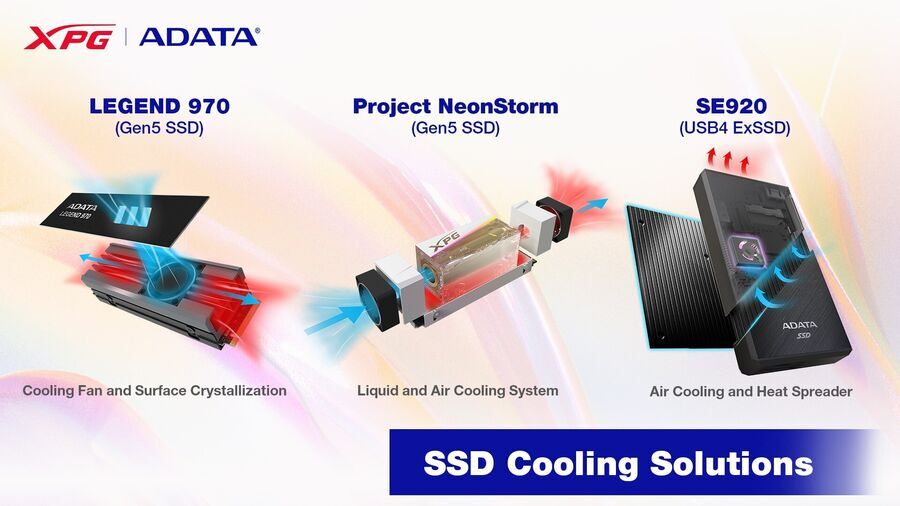
ADATA Technology has recently unveiled a groundbreaking line of cooling solutions for PCIe Gen5 solid-state…
May 30, 2023
Instagram has rolled out a new feature that allows users to rearrange posts on their…
Jun 9, 2026
Apple quietly included a Baybayin keyboard layout in iOS 27, announced at WWDC 2026. This…
Jun 9, 2026
We’ve all been here before. You’re transferring a file from your Windows computer to your…
Oct 8, 2018
AMD has announced the Radeon RX 9070 GRE. The Radeon RX 9070 GRE is a…
Jun 9, 2026
GPD has updated its MicroPC 2 handheld computer with a newer Intel Core 3 N350…
Jun 9, 2026But all our lives, we know that the best practice for this, is to find the 'Safely Remove Hardware' or 'Eject' button in the task bar before removing our external media. However, the 'Safely Remove Hardware' option can show you a pop-up that says the drive is still in use, and to close all programs before removing it.
At this point, it's a matter of "better safe than sorry", so if you aren't fond of hitting 'Safely Remove Hardware', then the least you can do is close all programs or windows that directly involve your external drive.
Our coverage of hardware includes: "ADATA debuts its comprehensive SSD cooling solutions"; "Instagram now lets users reorder their posts on their profile"; "iOS 27 Adds Native Baybayin Keyboard to iPhone: Here is How to Enable It". Each article provides unique insights and information.