


Intex Technology is a company that offers a wide range of electronic gadgets and appliances. They may not be that well-known here in the Philippines but they service to 63 countries manufacturing affordable devices that, according to them, aimed at experiencing future and living life which nobody has lived before. Let’s see if their tablet the Avatar IT-M809RC will live up to the company’s vision.

Unboxing
The Avatar IT-M809RC comes with an earphone, thicker than usual USB cable, humongous power adapter, a black and red pouch, warranty card and user manual housed in a very colorful and informative big box.

Design
My first impression when I saw the tablet is that it closely resembles a picture frame than a tablet. I didn’t like the idea of putting a thin silver lining in between the 8-inch glass screen and the black brushed metal bezel. To complete the picture-frame look, there’s a big white “Avatar†printed on the bottom bezel. I also didn’t like the location of the front-facing VGA camera which is at the top-right part of the tablet.

There’s a lot going on at the right side of the tablet. There’s a total of 6 ports (Standard-size USB Port, TF/MicroSD card slot, Mini-USB port, 3.5mm audio port, charging port and micro-HDMI port), 2 holes (MIC and Reset holes) and 1 button (Sleep/Wake, power button).

At the top of the tablet are 4 buttons, two for the volume rocker, M-button for Menu and the ESC button/Back Button.
Labels of the ports, holes and button as well as the diagonal opening for speakers can be found at the back of the Avatar.
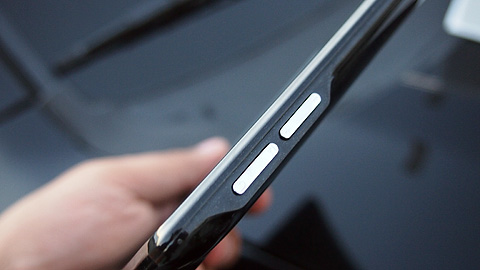
Here’s a quick rundown of its specs:
Dimension: 20.3 x 16 x 1.3cm (Take note its centimeter) 475g
Display: 8†Capacitive 2-Point Touch screen
Screen Resolution: 800 x 600, 4:3 Aspect Ratio (pixel density not mentioned but most likely under ~180ppi)
Processor:
CPU: 1GHz Cortex A8 core
GPU: Vivante GC800
Storage: 8GB internal memory (expandable up to 32Gb)
Camera: 0.3MP front camera
Connectivity: Wi-Fi 802.11 b/g (no N support) No GPS and No Bluetooth.
Battery: 5000mAh (5-6 hours with Wi-Fi)
OS: Custom Android Gingerbread (2.3.1)
Display
You know the sight of a brand new phone or tablet’s screen when you first turn it on without removing the thick protective screen guard? That’s the sight that you have to get used to when you’re using this tablet but without the screen guard. As bad as that may sound (or look) what intrigues me is the fact that the screen displays a pretty decent output when you’re watching a movie, browsing through your photos or playing a game.
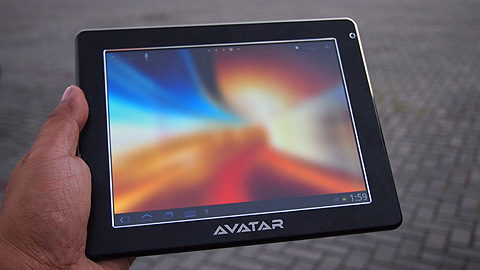
Though the display is still not at par with other tablets with higher resolution, there is a very noticeable difference in the display quality of the Avatar when at the home screen. This may has something to do with the OS, but more on that on the OS section. The low pixel density of the Avatar IT-M809RC, makes outdoor legibility a challenge even for the sharpest eyes.
Multimedia
The Avatar IT-M809RC is capable of producing good quality sound output either via the speaker or the 3.5mm jack. The speaker isn’t that loud but just enough to understand uttered words in a movie or song. Only thing I hate is the earphone that came with the tablet. It totally limited the tablets abilities to provide good sound quality. I strongly suggest using a different set of earphones on this one. Movie playback is also acceptable.

Though advertised to play movies in 1080p, I experienced some choppiness once in a while, and to the point that the media player did not respond and “Force Closesâ€. Same cannot be said when playing a clip at 720p. The tablet played through the entire 2 hour movie without breaking a sweat. And as mentioned on the Display Section, the viewing experience is relatively pleasing as compared to when you’re just toggling through different section of the tablet.
Here’s the list of supported file format of the tablet:
Audio: MP3/WMA/ AAC/OGG /WAV/APE/FLAC supported
Video: 1080p video of AVI/WMV/MP4/MKV/RM/RMVB/FLV/MOV/3GP, WebM VP8 decoding supported.
Operating System
Another odd thing about this tablet (besides its picture frame design) is its OS. The tablet, according to what is written on the system info, runs on Android Gingerbread (2.3.1) but when we initially turned on the tablet, we were greeted with a Honeycomb lock screen and layout. Navigating through the tablet’s selection is done using the four virtual controls (Back, Home, Search and Menu) which is also a Honeycomb feature. But going deeper in to the tab’s sections like “Settings†and we found ourselves back on Gingerbread. After some time using the tablet, we found out that the OS is somewhat “customed†in a sense that it is still, by essence, Gingerbread operated but has some Honeycomb-ish feel on some areas of the tablet.

Hypothetically speaking, I think that this has something to do with Intex’s marketing strategy to be competitive in terms of pricing and be able to attract buyers in the Honeycomb (and now transitioning to ICS) dominated Android Tablet market. So rather than licensing Honeycomb (which is more expensive and in turn will make the price tag of the tablet to go up), Intex decided to pre-install a launcher (RK Launcher) to the device to give it bit of flavor while keeping the price on the cheap side. However this decision proved to be crucial as the selected launcher doesn’t really fit well to the tablets screen, thus making the display look terrible on the home and lock screen.
Due to the nature of the custom OS, we found ourselves lacking some apps which are either not available on the Play Store, the app wont install (or if it did it force closes or is glitchy), or the app just wouldn’t launch even after installing it. To add more oddities, the Android Market/Play Store is nowhere to be found on the app drawer or anywhere for that matter unless you search it using the native search, which in my opinion is the strangest way of launching an app.
Apps
Depending on the region where this tablet was sold, the Avatar IT-M809RC comes pre-installed with some apps to cater to consumers on that region. This review unit came with iQuran (for our Moslem friends), eBook Reader, File Browser and Intex Zone which just provides a shortcut of commonly visited sites like Wikipedia, Google, YouTube, etc.
Performance
To the Avatar’s credit, the tablet is quite responsive on simple tasks and is able to handle my basic computing needs. Multi-tasking is also not so bad, only after 4 apps that the tablet shown a bit of an effort to switch from an app to another. My experience was rather pleasant for the most part, but then again that’s subjective. So here’s some benchmark test that we’ve done on the tablet and its corresponding results:
Nenamark Score: 49.4
Quadrant Standard: 1547
AnTuTu Benchmark Score: 2038
Here’s the breakdown:
RAM: 334
CPU Integer: 607
CPU float-point: 154
2D graphics: 245
3D graphics: 563
Database IO: 135
SD card write: 0
SD card read: 0
CPU Frequency: 1008MHz
Ports
Just like the other budget-friendly Android tablets that we previously featured, the specs isn’t as spectacular as compared to other high-end tablets but it’s got the bare essentials. What sets this tablet apart from the competition is the standard-size USB port. The tablet supports wired keyboard and mouse. To compensate for the lack of Bluetooth support, the port also supports USB wireless dongles for wireless keyboards/mice.

Lastly the tablet also has external HDD support for up to a whopping 1TB. I liked this feature because it eliminates the hassle of transferring files from one device to another, especially if you’re like most people who saved their movies (whatever movie that may be, ehem…) on a separate drive. What I didn’t like about the two USB ports (Standard and Mini) was the lack of charging capability through USB. I don’t know if they intended to do that or the MoBo just can’t handle that functionality, either way it can get particularly annoying when you have to carry along the gigantic charger on your long trips just to recharge. More on this on the battery section.
Camera
As with any part of this tablet, there’s nothing out of the ordinary about this tablet’s camera. The VGA camera should just be enough for video calling over Skype in a well lit room but that’s just pretty much it. Don’t plan on taking pictures of yourself with this camera as it will not bear any satisfying results.
Battery
The tablet is equipped with a 5000mAh battery that is said to power it for up to 5-6 hours with Wi-Fi is true based on my experience. Though this may not be as impressive as other tablets, it has enough juice to get you through your dull moments. The main problem that I have is not about the battery life but the charging. As mentioned on the Port Section of this article, the tablet doesn’t support charging over USB. But not only that you’re stuck with a big, non-market standard and Intex proprietary charger, the tablet also charges really really slow.
It takes 5 and half hours to fill up the tank from 1% or drained battery state. I thought that it may be a “first charge†thingy but after a couple more charges, I’m convinced that it’s the system.
Summary
We have seen numerous entry-level Android tablets made their way in to gadget stores with the same specs and price range as the Intex Avatar IT-M809RC. Unfortunately for this tablet, besides the standard sized USB 2.0 port, it doesn’t offer much of a definitive feature that would give it an edge against other tablets. But comparison aside, I think that the Intex Avatar IT-M809RC should be able to provide its users with their basic tablet needs. It’s got what you’d typically expect out of a Php7,995 tablet.




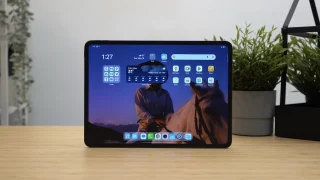
Intex Technology sounds like an exciting brand with a global reach! It’ll be interesting to see if their Avatar IT-M809RC tablet lives up to their vision of offering innovative and affordable devices. Looking forward to hearing more about it!