infinix x yugatech

Samsung Galaxy Tab 2 7.0 gets Jellybean update

Listen to article

We first reported that Samsung’s Galaxy Tab 2 (P3110) is getting a Jellybean update back in November. Just this week, the update has finally reached units released in the Philippines.

Reports are coming in that local units are now getting the update.
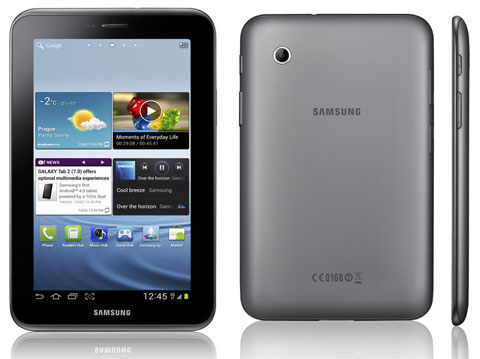
One follower twitted us this mornign with a screenshot of the Jellybean update to his Galaxy Tab 2.

Chime in on the comments section if you’re getting the same update as well.

Hat tip to @coolRaffy

React to this article:
Written by
Abe Olandres

Abe Olandres

Editor-in-chief

Abe is the founder and Editor-in-Chief of YugaTech with over 20 years of experience in the technology industry. He is one of the pioneers of blogging in the country and is considered by many as the Father of Tech Blogging in the Philippines.

View all posts by Abe Olandres →

87 Comments

SE
sensei · 13 years ago

I personally don’t like the UI of the Jellybean update in P3100. The home, back, and tasks buttons are hard to reach in landscape mode, which to me is counter intuitive. The Apps look cramped. The clock is small. The UI looks more like a phone than a tablet! Would it be ok not to update my tab?


Reply
RU
rudeboy428 · 13 years ago

just had my Tab updated last night to version 4.1.2!


Reply
RU
rudeboy428 · 13 years ago

Official Jellybean OTA update for GT-P3100 is now available!


Reply
JO
Jovan · 13 years ago

Any news on the update for P3100xxlh2, update for this baseband still not available till now, i do agree with joaquin why it was release to public if there there is no support for it? Or atleast give us the reason why .


Reply
DO
doogie · 13 years ago

Is p3100xxlh2 going to have an update at all?


Reply
JO
joaquin · 13 years ago

How come they released p3100xxlh2 locally and not have an update?
Will they release one?


Reply
CL
Clyde · 13 years ago

I just contacted Samsung Support and they said that the 4.1.2 update is only available for basebands P3100XXCMA4/P3100QLBCMA3/P3100DXDLL1/P3100XXCMA4.

I too have P3100XXLH2. Sucks.


Reply
AU
automated link · 13 years ago

Howdy! I realize this is sort of off-topic however I
had to ask. Does running a well-established blog like yours take a lot of work?
I’m completely new to blogging however I do write in my diary every day. I’d
like to start a blog so I can share my experience and views
online. Please let me know if you have any recommendations or
tips for brand new aspiring bloggers. Appreciate it!


Reply
JE
Jester · 13 years ago

Why My Samsung Tab 2 7.0 Has No Update Until now…. May Tab is Wifi+3g…

help naman dyan, ayaw talaga mag update eh…

Version 4.0.4
baseband ver:P3100XXLH2
build num:IMM76D.P3100XXBLH2


Reply
JD
JD · 13 years ago

bat sa inyo ayaw gumana e galaxy tab 2 7.0 p3100 din nman sakin . 4.1.2 na nga yung android version ng sakin e . punta lang kau sa service center ng samsung at ipa-update nyo :))


AL
Allen · 13 years ago

got the official 4.1.2 update yesterday :) got it thru OTA. hahaha now exploring my P3100

FYI sa lahat :)


Reply
HE
HeyBacolod · 13 years ago

I’m glad my Galaxy Tab 2 7″ got an OTA update last January. It’s super smooth now. I’m based in Bacolod.


Reply
PE
Perry · 13 years ago

I believe that’s for Tab 2 (P3110). Most of the people here are waiting for the official Jelly Bean update for the Tab 2 7.0 3G(P3100). I updated my P3100 manually earlier this month. My android version is now 4.1.2 Jelly Bean.


BE
benchbrat87 · 13 years ago

I keep on asking samsung ph for the updates and they’re telling me that it is still not available and asked me to like the samsung fb page.

*sigh*


Reply
JA
JAMES BRYAN · 13 years ago

still no update on samsung galaxy tab 2 7.0 GT-P3100 oin cauayan isabela


Reply
AL
alds · 13 years ago

paki clarify lang po para hindi nakakalito…
ang available na official jelly bean 4.1.2 update from Samsung ay para sa Samsung Galaxy Tab 2 7.0 Model: GT-P3110 only. Tama ba?
ung para sa Model: GT-P3100 (Wifi+3G) naman is not yet available sa Pinas pero available n s UK,Spain,India ang official jelly bean update.
Kahit ako hinihintay ko ang jelly bean update dito s pinas,at ayaw ko mavoid warranty from flashing
firmware


Reply
JA
JAMES BRYAN · 13 years ago

still no update on my gt-p3100 what should i do???? i can’t wait….


Reply
JA
james · 13 years ago

I have p3100 but no update available still stuck to 4.0.4


Reply
PE
Perry · 13 years ago

Hi, I updated my P3100 manually through ODIN last week. I downloaded Spain’s firmware (Don’t worry your tab will not be in Spanish once done) You may refer to the link below for the steps:

http://www.android.gs/update-samsung-galaxy-tab-2-7-0-p3100-to-official-android-4-1-1-jelly-bean-buclk-firmware/

*Correction lang po sa Step 4: Download Mode should be “Long Press both Power and Volume Down”.

*For Step 8: You will need to press ‘Start’ twice. The second one is after the initial installation. (I noticed it stopped so I pressed it again).

*Correction din po sa Note 2: Recovery Mode should be “Long Press both Power Button and Volume Up” until the tab blinks and shows the Galaxy Tab 2 7.0 logo then “release”. The tab will then enter the “Recovery Mode”.

Note: Please don’t forget to back up your files. Although the files and apps were not deleted during the update. Buti na ang sigurado c”,?


KO
koki · 13 years ago

poor p3100, makes me wanna sell it.. ***sigh


Reply
MD
mdm782010 · 13 years ago

Bakit sa akin P3100 no available updates pa rin?


Reply
MA
makiroller · 13 years ago

My P3100’s not getting an update yet.


Reply
KO
koki · 13 years ago

meron din ba for p3100??


Reply
RE
reiearth · 13 years ago

mine is galaxy tab 2 10.1 P5100

dahil sa tagal mag update sa akin kasi sa brazil yung region nya…

i flash it via odin to update to 4.1.1

pero parang kunti lang ang nagbago… bumilis sya pero marami pang kulang like jellybean 4.2.1

i rooted it then install CWM then CM 10.1 jellybean 4.2.1 much better/faster/smoother… love the user profiles.. the screenshot is gone but you can press power+volume down or you can have a screenshot by putting it in the power menu…


Reply
NO
NonoyMM · 13 years ago

Been running Jelly Bean on my Tab 2 7.0 (P3100) since Nov last year. CM10 has been out a long time ago :-) for this device so, this is late….
Check out xda-developers and you’ll get the latest Adroid variety for this device. don’t wait for Sammy to update their bloated OS…. CM10 is much better than this stock firmware.


Reply
MA
Margi · 13 years ago

Received my update on tab 2 7.0 and now lost the ability to take pictures of the screen. The option no longer exists??


Reply
MA
Marco · 13 years ago

You still can. I tested it. Hold the power button and volume ( – ) button at the same time for two-three seconds. The bad thing is, you cannot edit. like drawings, etc.


MA
manuel · 13 years ago

guys any updates on tab P6200? like ICS or JB?


Reply
SE
Sei Sei · 13 years ago

updated my samsung gt-p3110 OTA, First I kept on trying it with Kies but it kept on crashing on me! So i tried OTA using wifi and it was much faster! My tab is much smoother now and I can watch movies while doing other stuffs on the same screen! Well i havent explored my tab completely… goodluck guys!


Reply
WH
wha · 13 years ago

My sgt2 10.1 is already updated to jelly bean. Already tweeted but didnt get any tweetback from u ser yuga


Reply
PE
Perry · 13 years ago

I did an update last year OTA and it worked. I’m just wondering why I can’t right now. Anyway, I’ll try it tomorrow.


Reply
IC
Icko · 13 years ago

Just updated my samsung galaxy tab 2 P3110, 30mins ago. :)


Reply
MA
Marc · 13 years ago

Use Samsung Kies when you’re doing your OS updates.


Reply
9E
9evian6 · 13 years ago

buti na lang, may naka-installed akong Kies because of Samsung Wave, mabilis mag-update.


PE
Perry · 13 years ago

I tried it OTA pero wala. I’ll try it tomorrow. Thanks, bro!


Reply
AL
Allen · 13 years ago

I have a P3100 and I got the update last January 6… I updated my Tab via Samsung Kies… hehe


Reply
AL
allen · 13 years ago

here’s the proof…

https://www.facebook.com/photo.php?fbid=5001403720160&set=a.1357291059621.2049845.1451821123&type=1

Tama naman ako na JB update siya diba? hehe


PE
Perry · 13 years ago

I tried it OTA pero wla daw. I’ll try it tomorrow. Thanks bro!


PE
Perry · 13 years ago

Bro, i’m using KIES now but my P3100 did not detect any update :( Grrrr! Hehe. My current Android version is 4.0.4


JA
JAMES BRYAN · 13 years ago

dude i have P3100 but did not detect any update to jellybeans ??? kies say this is 4.0.4 is the lates Firmware.???


PE
Perry · 13 years ago

Tsk! I thought you guys were referring to Tab 2 7.0 P3100. Haaaaaaay…


Reply
EN
engrjayze · 13 years ago

sigh..here i am wishing for a tab 7.7 jb update


Reply
MO
mom tours · 13 years ago

Haven’t received any auto updates yet. Where and how do i get it?


Reply

Leave a Reply

Loading next article...