


The folks from MSI-ECS sent us a couple of their new Belkin Wireless N routers to try out. The cheaper one, the N150, promises LAN speeds of up to 150Mbps while the faster one, the N300, can do up to 300Mbps on the local wireless network. We tested them out to see if they can do just that.

These two are actually just the entry-level Wireless-N routers from Belkin and thus, can be had at a more affordable prices (mostly under Php3k each).
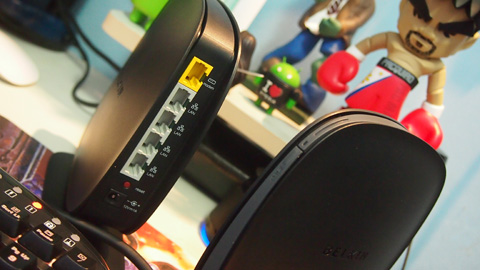
The dish-shaped routers sits upright with a wine-glass stand. There are no attachable external antenna support but comes with 4 LAN ports running at 100Mbps. I was actually hoping it would be a 1Gbps port but we’re more focused on the WiFi speed itself.

The routers are pretty easy to set up. Just plug the DSL cable to the WAN port, connect the power to the wall socket and hook up to the WiFi. The WiFi AP has a preset security password, a copy of which is included in the box (printed in a small piece of paper).
Once you’re logged in, you can change this password to your liking. You may access the LAN portal via the IP address in your browser (defaults at 192.168.2.1). The LAN portal is not password protected (i.e., blank) and you should change this once you’re in.

The router admin portal is pretty extensive but you should be able to get the DSL connection easily.
The DHCP settings are already set to automatic so any wireless device or wired connection to the router will be added into the IP pool immediately. Aside from that, there should be nothing else you need to configure to get your wireless LAN working.

I connected the my Drobo FS to the router and tried to transfer large files from my the Drobo to my laptop. I was able to get a sustained ~10MB/s transfer speed over WiFi. I think the bottleneck here is the wired connection from the Drobo to the router which is just 100Mbps.
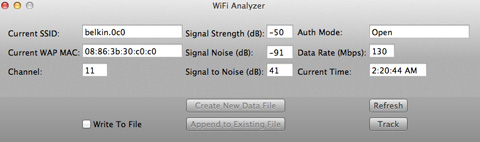
I also use the WiFi Analyzer app installed on my Macbook Air to diagnose the wireless network and got an optimal bandwidth rating of 130Mbps at 10 feet away with a signal strength of -50dB.
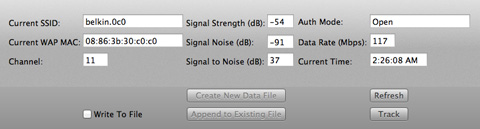
At 20 feet away, the bandwidth degrades to 117Mbps and a signal strength of -54dB. Wasn’t able to figure out how far away from the router I can go without losing any WiFi signal though.
Belkin N300 Wireless-N router:
Single-band 2.4GHz bandwidth
WiFi 802.11 b/g/n
up to 300Mbps data transfer rate
4 x Ethernet 10Base-T/100Base-TX
up to 16 wireless LAN connections
Encryption: 128-bit WEP, 256-bit WPA, 64-bit WEP, WPA2
1 x network status LED, 1x WPS LED
The box comes with the router, the power supply cable, CD installer and a meter-long RJ45 cable.
The Belkin N300 retails for Php2,990 while the Belkin N150 is Php1,000 cheaper at Php1,990. You should see them in local stores in malls and PC shops.
Note: MSI-ECS is the Philippine distributor of Belkin routers in the Philippines.






The Belkin N300 and N150 are one of the best wireless routers of Belkin. They are easy to install and easy to use. But as you know that these are wireless routers so it may create some problem for their new users while installing. For them, this link will give the best help while installing these wireless router. If you don’t know how to install it then please visit here at once.