infinix x yugatech

Huawei E5151 adds LAN port to Pocket WiFi

Listen to article

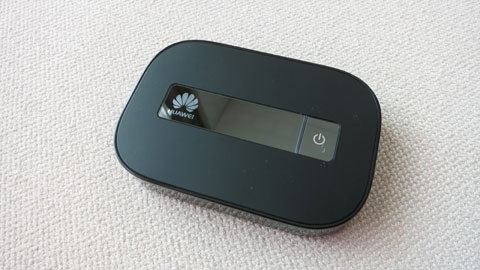
Huawei’s newest iteration of their pocket WiFi is slightly different from the previous ones. The E5151 comes with a built-in LAN port just in case you want to hook it up to a wired line.
In my previous foreign trips, I would always bring with me a Huawei pocket WiFi and a portable WiFi router (like this one). The pocket WiFi is for a local 3G SIM that I normally use to avoid data roaming charges while the portable WiFi router is the one I use to convert hotel wired internet to wireless.

The Huawei E5151 solves that problem by incorporating a full-sized LAN port into the pocket WiFi. So, when I’m outdoors, I’d use the pocket WiFi function but when I’m in the hotel room, I’d hook it up to the hotel’s wired internet connection.

It’s especially useful since my Asus Zenbook Prime and Macbook Air don’t have built-in LAN ports. It also makes it more convenient when you want to connect all your portable devices like smartphones and tablets all at the same time (some hotel’s WiFi network only allows 1 to 3 devices at the same time for each login credentials).

The E5151 has a removable Li-Ion battery that lasts about 5 hours on a full single charge (uses a micro-USB port for charging via laptop or wall socket). It supports HSPA+ networks and can theoretically reach up to 21.6Mbps downlink speeds.

The device is a bit chunkier than the usual pocket WiFis from Huawei, probably because of the LAN port (92.8×63.5×16.3mm dimension).

It doesn’t have an LED display though unlike the E586 but still has a simple LED service indicators instead. However, you can download the iOS or Android app to allow you to manage the settings and monitor resources like signal, battery life and number of connected devices (in this case, the E5151 supports up to 10).

We still don’t have an idea about pricing and local availability but we’ll update this post once we get info from Huawei Philippines (some online stores peg it at $186). We also have a spare unit here that we’ll be giving away to readers too.

React to this article:
Written by
Abe Olandres

Abe Olandres

Editor-in-chief

Abe is the founder and Editor-in-Chief of YugaTech with over 20 years of experience in the technology industry. He is one of the pioneers of blogging in the country and is considered by many as the Father of Tech Blogging in the Philippines.

View all posts by Abe Olandres →

92 Comments

AL
Albert · 12 years ago

it’s a good 3g pocket WiFi, i had bought it from http://www.4glterouteur.eu/huawei-e5151-routeur-3g-21mpbs-mobile-wifi.html

But i’m waiting for the 4G Pocket WiFi with LAN Port


Reply
LE
Leo Ilagan · 12 years ago

Does this work with LTE?


Reply
JO
John · 12 years ago

will it connect automatically to the internet once I hook it up to my PC?


Reply
DR
Drew S · 12 years ago

Would it be alright to ask how you configured it to be a wifi router in the hotel LAN set.up? I’d really wanna know how to do it and i’m honest enough to admit i’m a bit of a Noob


Reply
RO
Robert Wong · 13 years ago

Hi, anyone can confirm if this pocket wifi works in PS3? or maybe use the ethernet port to plug it in.


Reply
JH
jhay-ar · 13 years ago

hi! im jhay-ar i need pocket wifi for my andriod tablet coz i dont have one and i need it to share it to my frieds who wants to get free wifi!!


Reply
RE
reggie abby r · 13 years ago

I’d name the pocket Wifi — sam witWeeFee, because “WeeFee” is how I first learned to read the term “WiFi” and I name my gadgets after Transformers characters. This baby will fit right in. Please make me win :)


Reply
AC
acvoiejp12 · 13 years ago

If you were to name this pocket WiFi’s ID, it would be “wifi is in my pocket”.


Reply
RC
rc_kunoichi · 13 years ago

I’d name it: “One (Pocket) Wifi To Rule Them All”. Hahaha. Nerd. :p


Reply
CL
clint · 13 years ago

pocket genius :)


Reply
RU
Ruby Salazar Papio · 13 years ago

”Here You go”


Reply
RO
RODEL S. MERCURIO · 13 years ago

If you were to name this pocket WiFi’s ID, what would it be?
Answer: The name that i given is “Genius Wifi”


Reply
RE
Resly Morgado · 13 years ago

If I were to name this pocket WiFi’s ID,I want Wifi for you!


Reply
JO
Jocel Santos · 13 years ago

pretty wifi mine.


Reply
SA
sarah · 13 years ago

If you were to name this pocket WiFi’s ID it will be “wifi4every1”


Reply
JO
Jowen Palmaria · 13 years ago

If I were to name this pocket WiFi’s ID, I would choose “WiFiForFree”.


Reply
ER
Erwin Collado · 13 years ago

if i were to name my pocket wifi it will be “Fly with Me”


Reply
JP
JP · 13 years ago

I had already a “Virus” and “Trojan”
So id for this one would be “Worm” I guess.


Reply
MI
Migs · 13 years ago

If you were to name this pocket WiFi’s ID, what would it be?

‘Akin.’


Reply
CL
Clyde A. Gabriel · 13 years ago

The ID would be…

WeeWee5151


Reply
JO
jorussic · 13 years ago

If you were to name this pocket WiFi’s ID, what would it be?

I would name it SexyAbe. Or HuawAbe.


Reply
VR
vricafrente · 13 years ago

I will name Huawei E5151 Pocket WiFi as “MyE5151”


Reply
RO
RODEL S. MERCURIO · 13 years ago

If you were to name this pocket WiFi’s ID, what would it be?
Answer: Huawei E5151.


Reply
RO
RODEL S. MERCURIO · 13 years ago

If you were to name this pocket WiFi’s ID, what would it be?
Answer: The amazing pocket wifi


Reply
ON
one · 13 years ago

hello, ask ko lang, pano pag gamit nito? kailangan ba loadan to? pag gamitin wifi?


Reply
IS
ishi · 13 years ago

Im waiting for LTE pocket wifi although already available on online seller its quite expensive.


Reply
21
212121 · 13 years ago

3,500php only at J Solution Store in V Mall Greenhills :)


Reply
RA
razorous · 13 years ago

Slash the batteries: http://engt.co/YgIt8c


Reply
MD
mdm782010 · 13 years ago

akala ko ba nman lte na para pwede nang magrealtime video chat sa skype.


Reply
AL
Allen · 13 years ago

Is it unlocked?


Reply
JA
jay · 13 years ago

?4500 at this store in megamall. It’s that corner store across octagon


Reply
JA
jay · 13 years ago

?4500 at this store in megamall. It’s that corner store across octagon


Reply
MA
marnieto zerna · 13 years ago

Inquire Lang ko regarding Huawei e5151, kung magkano ang delivery thru LBC here in negros oriental. Parang nabasa ko sa MULTIPLY na parang may 100 subsidy. Thanks!


AK
akositantan · 13 years ago

@yugatech
please write about “Android Mini Pc” a.k.a “PenDroid”, “SmartStick”, “Miniand”, “Android TV Stick”..^_^ For sure magboboom ito in the coming months! =)

http://www.engadget.com/2012/06/07/mk802-android-4-0-mini-pc-hands-on-impressions/

TIA


Reply
TO
Ton Buenaseda · 13 years ago

P3990 sulit.com :)


Reply
AL
alvin · 13 years ago

wow! this gadget is nice! i want! hehe:)


Reply
DW
dwarf · 13 years ago

4,500 at a store in megamall


Reply
VI
Vince · 13 years ago

Care to share which store in Megamall?


KA
Kara · 13 years ago

Oh awesome! Hope the pricing isn’t too bad!


Reply
MR
MrOrange · 13 years ago

I think i saw this at VMall I might be mistaken. Check Abacus Computer they have alot of stuff.


Reply
MR
MrOrange · 13 years ago

this is already being sold locally. check Abacus Computer at VMall.


Reply
ME
meh · 13 years ago

Its great too bad almost no where in the philippines where the speed is decent enough to actually use this (except maybe greenhills or eastwood) but i even get slow speeds for data in makati, so it feels hopeless


Reply
CL
Cliff Rosario · 13 years ago

Nice. Huawei is pushing innovation by making their products convenient for its target market not so much of the flashy upgrades but very useful ones.


Reply
'E
’em · 13 years ago

Ayos ito! Sana maging available soon sa Pinas!


Reply

Leave a Reply

Loading next article...