infinix x yugatech

Hands-On: Huawei E589 LTE Pocket WiFi

Listen to article

Now that both Globe and Smart have rolled out their respective LTE networks, both have also offered LTE pricing plans for subscribers. Aside from the iPhone 5, one of the more important devices that you can use to connect to the LTE network is the Huawei E589.

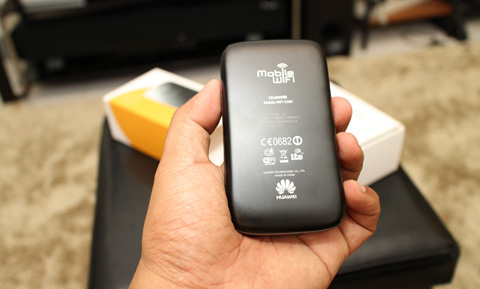
We managed to grab a hold of an openline E589 and used our Globe postpaid nano SIM with it. Unlike the previous pocket WiFi devices from Huawei, the E589 has a unibody design so the internal battery is non-removable.

The device is a bit heavy and much bigger than the previous pocket WiFi we have used in the past. Actually, it already feels like it’s the same size as one of those entry-level Android phones like the Optimus L3 or the Galaxy Pocket.
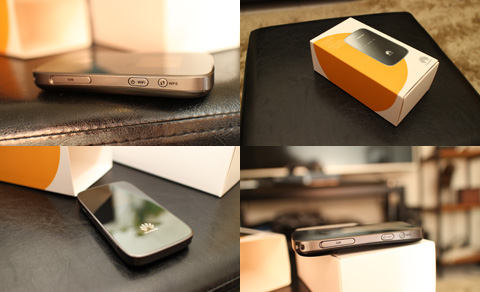
The SIM card slot is designed for a regular SIM card so you will need to use a nano-SIM cradle when using your nano SIM card.

Huawei E589 specs:

LTE 4G, 3G, 2G multimode
LTE Cat 3
LCD Screen
Download speed up to 100 Mbit / s
Upload speeds up to 50Mbits
LTE 2600/2100/1800/900/DD800 MHz
GSM 800/900/1800/1900 MHz
UMTS 2100/900Mhz
6 hours of battery life
WiFi 802.11 b/g/n
up to 32GB via microSD card
113 x 62 x 13.5mm (dimensions)
120g (weight)

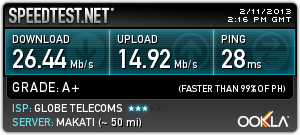
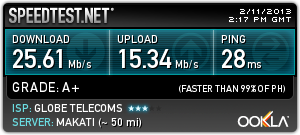
We did several runs on Speedtest.net and got these results:
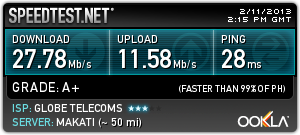
These were all taken using the Huawei E589 running on a Globe postpaid nano-SIM with a desktop PC connected via WiFi that ran/recorded the speed tests.
According to Huawei’s website, the E589 is compatible with both Smart and Globe’s LTE network in the Philippines. Will also try this on a Smart’s SIM and see how it fares.

You can get this Huawei E589 at Hot Gadgets for Php9,800 (see listing here).

Frequently Asked Questions

Is the Huawei E589 compatible with both Globe and Smart LTE networks in the Philippines?
According to Huawei's website, the E589 is compatible with both Smart and Globe's LTE network in the Philippines.
Does the Huawei E589 have a removable battery?
The Huawei E589 has a unibody design so the internal battery is non-removable.
What type of SIM card does the Huawei E589 use?
The SIM card slot is designed for a regular SIM card so you will need to use a nano-SIM cradle when using your nano SIM card.
React to this article:
Written by
Abe Olandres

Abe Olandres

Editor-in-chief

Abe is the founder and Editor-in-Chief of YugaTech with over 20 years of experience in the technology industry. He is one of the pioneers of blogging in the country and is considered by many as the Father of Tech Blogging in the Philippines.

View all posts by Abe Olandres →

72 Comments

HU
Huawei E589 · 12 years ago

i already bought the Huawei E589 from http://www.4gltemall.com/huawei-e589-4g-lte-mobile-wifi.html

Where can i buy the antenna for Huawei E589? Do you sell the antenna?


Reply
DE
Dennis · 12 years ago

Just want to ask where can I buy an antenna?
I got this pocket wifi and I want to boost it using an antenna. tnx


Reply
CA
carlo · 12 years ago

Hi just want to ask can i use internation sim cards like for exp. indo sim. and can I also use it anywre?


Reply
MA
Marc-cielo · 12 years ago

saan po ba may available na stuck n2


Reply
DO
Don · 13 years ago

Just remember lte is not country wide nor is it province wide! So right now lte is not worth anything unless you live in manila and only certain parts! So I would suggest people stay away from Lte 4G until it has better coverage, this will in turn force globe and smart to improve there coverage areas. I know you read reports that they cover other areas but false advertizement is the norm with globe and smart consumer beware…


Reply
SC
Scyther · 13 years ago

Ask ko lang kung possible din ba na mailagay ang nano sim with sim card adaptor to Huawei E5776, ang model ng Globe LTE Pocket Wifi, nakalagay kc sa manual na dih pwede ang nano sim with adaptor. Since nagamit naman dito sa Huawei E489, Possible din ba sa Huawei E5776?


Reply
ER
ergarcia · 13 years ago

sa infomax meron pero ang mahal 14,500 na cya;(


Reply
NO
nontechsavvy · 13 years ago

anong model number po yung sa smart bro pocket wifi lte? :)


Reply
NE
nev · 13 years ago

very expensive.


Reply
JA
jazmin · 13 years ago

sold out na po dun sa hot gadgets – do you know any vendors here in cebu?


Reply
AA
Aamos · 13 years ago

Sir Abe, what kind of sim did you use in here? Did you use postpaid or prepaid? Thanks.


Reply
AD
adoy · 13 years ago

Read. Read. Read.


IN
in0ah · 13 years ago

wtf! yang huawei e589 inaabangan ko dito sa pinas wala ako makita eh.. taz recently lng nakabili ako ng huawei e587 ke hotgadgets biglang nagkaroon ng e589.. tsk tsk, sayang. wooot.. hintay rin muna ako ng prepaid na lte, naka plan 999 lng muna ako sa smartbro ngaun, not quite satisfied kasi last year before mag upgrade ang smart pumapalo speed ko ng average 4~5mbps (prepaid) anytime pero simula nung march 2011 wala na, bihira na umabot ng 2mbps,(postpaid pa)sana magimprove pa mga service provider natin..


Reply
KA
kaninglamig · 13 years ago

I purchased this device 3 weeks ago. although I don’t have LTE sim card, I used ordinary prepaid sim from smart and napansin ko mas mabilis sya kaysa sa ibang 4G dongle available.

mas maganda rin yung extrang weight nya and size kasi hindi mukang mumurahin lang and alam mong mataas ang quality ng MiFi na dala mo.

as for the battery life, a fully charged E589 last a max of 4 hours (running only HSDPA), di ko lang sure pero sigurado mas mababa pa pag LTE or HSPA+ sya nakaconnect.

once I got hold of my LTE sim I will try it with the E589 but so far I’m very satisfied with the speed and reliability of this device and mas maganda siguro kung bibili na kayo habang mas maaga kasi baka tumaas ang price ng mga ganitong dongles once naglabas na ng prepaid LTE ang Smart and Globe.


Reply
EN
Enya · 13 years ago

Im having similar speeds with my Xperia V from Smart over at Shangrila Mall


Reply
ME
meh · 13 years ago

I wouldnt mind buying this in full/cash and then prepay to use LTE as needed if i could be assured of the coverage. They have locations on the coverage map but they dont explain how far that reaches.

I can’t afford to buy this to be a test subject, they should be more clear on where this works. Also, its a shame that the LTE spots are just that, spots, why doesn’t it blanket the whole city?


Reply
FE
ferdinand marte · 13 years ago

good lord, 9.8K for this!!! first you subscribe to a pricey LTE plan, then this, just so you can connect your LTE capable mobile devices outside. that’s a lot of cash. is the user really assured to connect to LTE everytime, anywhere in the country? oh well, this isn’t for me yet. besides i’m getting my fill with smartphone-laptop wifi tethering.


Reply
HB
hbato · 13 years ago

Dito sa may McDo (back of GB1) around 7Mbps lang pero once you’re inside GB pumapalo na ng ~30Mbps.


Reply
JU
Justin · 13 years ago

Yuga, request lang. I’m wondering if you an run those speed tests somewhere in the south (i.e. Alabang, Cavite or Laguna). Lagi naman talaga mabilis dyan sa Makati, eh, because that’s where Globe/Smart is concentrating their LTE coverage.


Reply
JO
jozef · 13 years ago

i think the article is focused on how far can this device operate with Globe’s LTE not how fast Globe’s LTE compared to Smart


ME
me · 13 years ago

mhal.. dme dyn ibng brand same lng . cheapr pa..mga 2-3k plus only.


Reply
YE
Yes Gaming · 13 years ago

Cool. nice pocket wifi. :D


Reply
SM
Smokescreen · 13 years ago

A bit too expensive for me.


Reply
IS
ishi · 13 years ago

Looking for other brand around 5k.


Reply
TE
Terence Jean Jaquet · 13 years ago

I think the latency is too low for a wireless device :O


Reply
JO
jozef · 13 years ago

sorry, but the lower the latency the better the connection. ;-)


BR
Bryan · 13 years ago

Dude, I think you need to check google for the meaning of latency.:))


BR
Bryan · 13 years ago

I’m addressing to Terence btw.


AN
Anonymous · 13 years ago

How about battery life sir on straight LTE stress test?


Reply
MO
Monchee Yuson · 13 years ago

Is there any cheaper alternative?


Reply
E2
e2000 · 13 years ago

you can just buy an LTE korean android phone for around 6-8k.


TI
Timbong · 13 years ago

Did you use ordinary sim card or a LTE sim card?


Reply
AB
Abe Olandres Editor-in-chief · 13 years ago

LTE nano-SIM card used from my iPhone 5.


TI
Timbong · 13 years ago

Did you ordinary sim card or a LTE sim card?


Reply
MA
Markcy · 13 years ago

Sir Abe, do you know any store where I can buy the SIM adapter/cradle?


Reply
BE
bern · 13 years ago

sa Quiapo marami.


Leave a Reply

Loading next article...