infinix x yugatech

Western Digital MyNet N900 Central Wireless Router

Listen to article

I’ve known Western Digital as a storage and HDD company for the longest time so I’m a bit surprised to learn that they have moved into the wireless networking market. The company sent us this WD MyNet N900 Central router to check out.

What makes the WD MyNet N900 Central different from all the other routers we’ve seen and tested is that this model comes with a 2TB Western Digital HDD right inside the box.

While most other high-end routers provide USB ports so you can attached any type of storage to extend and share within your network, the My Net N900 Central already has built-in storage that automatically allows you to share multimedia files and stream content from within your network.

Here’s a quick unboxing and introduction of the device:

From the way it works, it looks like a cross between a WiFi router and a NAS.

The router is a bit larger than the usual ones and also a bit heavier because of the space occupied by the HDD inside the device. The unit sits flat on its belly to give it a stable position and avoid shaking the HDD inside the box.
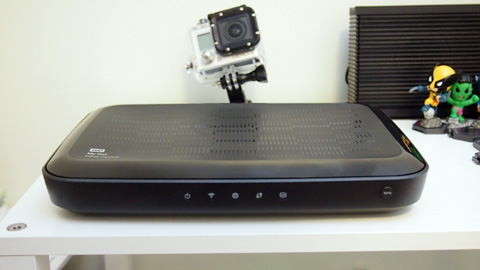

Go Pro Hero 3, at the back, not included.

At the back side, you have 4 Gigabit LAN ports, a WAN port for your DSL modem and a single USB 2.0 port for attaching a network printer or another portable Western Digital HDD.
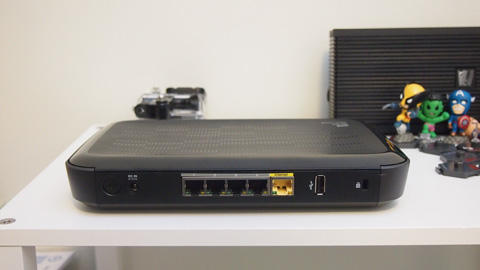
The N900 Central also come with dual-band frequencies so both the 2.4GHz and the 5.0GHz bands have a maximum throughput of 450Mbps each for a total of 900Mbps wireles network speed.

Using an app for your iPhone or iPad, you can also access content of the N900 Central remotely (as if you have your own personal, private cloud storage).
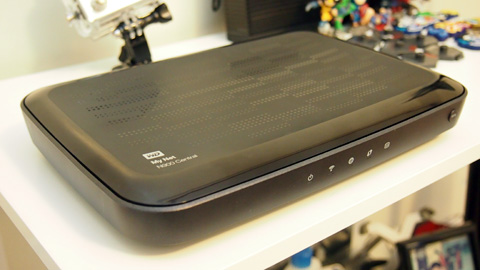
The Western Digital MyNet N900 Central was released back in December 13 and is now available in stores with a retail price of Php11,690 (for the 2TB model).

P.S. By the way, we’re also including this in our great gadget giveaway. Check the details here.

Frequently Asked Questions

What makes the WD MyNet N900 Central different from other routers?
It comes with a 2TB Western Digital HDD inside the box for built-in storage.
What ports are available on the back of the router?
It has 4 Gigabit LAN ports, a WAN port, and a single USB 2.0 port.
What are the wireless specifications of the N900 Central?
It supports dual-band frequencies with 450Mbps on both 2.4GHz and 5.0GHz bands.
React to this article:
Written by
Abe Olandres

Abe Olandres

Editor-in-chief

Abe is the founder and Editor-in-Chief of YugaTech with over 20 years of experience in the technology industry. He is one of the pioneers of blogging in the country and is considered by many as the Father of Tech Blogging in the Philippines.

View all posts by Abe Olandres →

10 Comments

AL
Alyn Amarillo · 13 years ago

My 1yr old 500GB WD My Passport Essential http://img829.imageshack.us/img829/6779/201212311621.jpg


Reply
JV
JV S · 13 years ago

I want one!


Reply
EN
Ena Quitain · 13 years ago

http://i46.tinypic.com/2aiekb4.jpg

I’ve had this 500GB My Passport since 2009. I haven’t been using it much since there’s no more space left. :)


Reply
DA
Darwin Abuyo · 13 years ago

wow 2 TB?


Reply
AL
Alexander Castillo · 13 years ago
Reply
MA
Ma. Vanesa Medalla · 13 years ago

Here’s my Western Digital external hard drive. (500gb)This helps me store my important files & I know I can rely on Western Digital when it comes to data storage.

https://twitter.com/iamMVIM/status/285052055733813249/photo/1


Reply
RA
razorous · 13 years ago

Just curious sir Abe, why was the Go Pro Hero 3 on the image? Was it meant to be plugged in the USB port to work as a surveillance or IP Cam of some sort?


Reply
FR
Francis Alincastre · 13 years ago

http://twitpic.com/bqh17e

WD Mybook Essential 1TB bought 2yrs ago. actually, i had to transfer the HD to that enclosure behind it coz the usb port broke off


Reply
MR
MrsNoodleBoy · 13 years ago

This is my WD My Passport Elite 500gb Titanium that I’ve had since 2009 :)

https://pbs.twimg.com/media/A_SK9drCAAA8W7V.jpg


Reply
CH
Chris · 13 years ago

Parang NAS din ah.


Reply

Leave a Reply

Loading next article...