

One good example of that printer is the Brother DCP-T420W. Design-wise, the Brother DCP-T420W looks like your typical printer. Setting up the Brother DCP-T420W requires several steps but pretty much easy to follow. The first thing we did is download the Brother iPrint & Scan app. Connect your mobile device to the Brother DCP-T420W's WiFi setup network, then return to the app. As for its printing capabilities, the Brother DCP-T420W is capable of print speeds of up to 16/9 ipm, while the Brother Ultra High Yield Ink bottles are capable of up to 7,500 black prints and up to 5,000 pages in color. What we really enjoyed with the Brother DCP-T420W is how easy it is to set up and use. We just download it from the phone, open the Brother iPrint & Scan app, then print. Read more in our articles including "Brother DCP-T420W Refill Tank Printer: Fun and Convenient Wireless Printing" and "Promo: Brother 2015 Calendar of Me Contest".
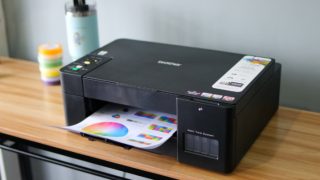
Old-school printing is usually cumbersome. You need to connect your PC or laptop using a…
Feb 11, 2021Kick off 2015 with fantastic prizes and freebies from Brother Philippines! With the Brother 2015…
Dec 30, 2014Brother Philippines has announced a new set of laser printers in the Philippines. These are…
Dec 18, 2014
Business laptops have come a long way from being simple tools for emails and spreadsheets.…
Jul 1, 2026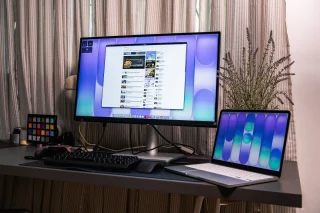
As someone who occasionally uses a laptop to work, one thing I sometimes wish for…
Jun 30, 2026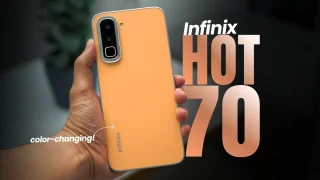
Coming in hot in the entry-level segment is the new Infinix HOT 70, and for…
Jun 25, 2026One good example of that printer is the Brother DCP-T420W. Design-wise, the Brother DCP-T420W looks like your typical printer.
Setting up the Brother DCP-T420W requires several steps but pretty much easy to follow. The first thing we did is download the Brother iPrint & Scan app. Connect your mobile device to the Brother DCP-T420W's WiFi setup network, then return to the app.
Our coverage of brother philippines includes: "Brother DCP-T420W Refill Tank Printer: Fun and Convenient Wireless Printing"; "Promo: Brother 2015 Calendar of Me Contest"; "Brother outs new laser printers, starts at Php6,990". Each article provides unique insights and information.