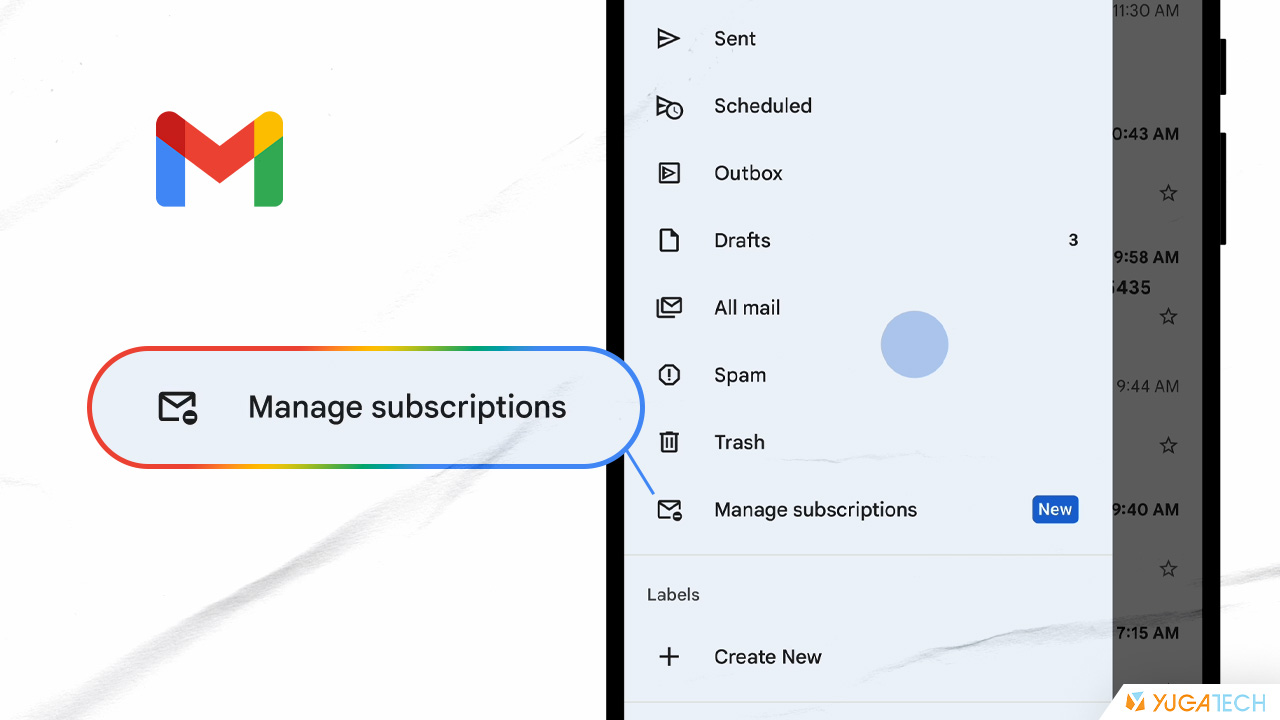

Called "Manage subscriptions," this new tab shows a list of all the email subscriptions you've received recently, with the most frequent senders placed at the top. To find the feature, open the Gmail sidebar (top left corner of your inbox) and look for "Manage subscriptions" in the menu. Read more in our articles including "Gmail’s new feature makes it easier to unsubscribe from mailing lists" and "Gmailify gives other email service providers Gmail features".
Google is rolling out a new feature in Gmail aimed at helping users declutter subscription…
Jul 9, 2025Gmail still has the most number of useful features than other email providers, free or paid.…
Feb 18, 2016
Apple Pay is now available in the Philippines. Initial issuing banks include GoTyme, MetroBank, Union…
Aug 4, 2026
Google axes AI Studio app before official launch. Google AI Studio has announced that it…
Aug 4, 2026
Samsung has announced that Prime Video will be the first streaming service to support HDR10+…
Aug 4, 2026
TCL has once again been named the No. 1 Panel TV Brand in the Philippines,…
Aug 3, 2026Called "Manage subscriptions," this new tab shows a list of all the email subscriptions you've received recently, with the most frequent senders placed at the top. To find the feature, open the Gmail sidebar (top left corner of your inbox) and look for "Manage subscriptions" in the menu.
Our coverage of gmail manage subscriptions includes: "Gmail’s new feature makes it easier to unsubscribe from mailing lists"; "Gmailify gives other email service providers Gmail features"; "Apple Pay launches in the Philippines". Each article provides unique insights and information.