

Google Earth has unveiled a new feature called Creation Tools. It allows users to turn Google Earth into a personal storytelling canvas. With the creation tools, users can draw their own placemarks, lines, and shapes on Google Earth. Currently, Google Earth's creation tools are only available on the web version. I know this is a little bit of old news actually but I recently re-installed a copy of Google Earth on my desktop PC and went straight ahead to the Flight Simulation mode to test out how accurate the maps and terrains are. If you haven't seen this, go ahead and download Google Earth here. Google Earth lets you fly anywhere on Earth to view satellite imagery, maps, terrain, 3D buildings, the ocean and even galaxies in outer space (just go to Tools -> Flight Simulation). Here's a video capture of the flight simulation via Google Earth I saw the other day: There are also other software that does similar things (in fact, a whole lot better in terms of detail). Read more in our articles including "Google Earth introduces Creation Tools feature" and "Flight Simulation on Google Earth".
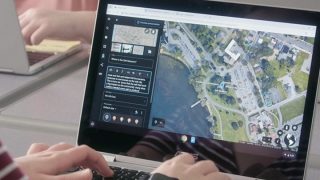
Google Earth has unveiled a new feature called Creation Tools. It allows users to turn Google…
Nov 22, 2019I know this is a little bit of old news actually but I recently re-installed…
Jun 14, 2011There was some sort of mass panic last night when Google was spewing a warning…
Feb 1, 2009
POCO has officially announced the POCO M8 Power, doubling down on battery life as the…
Aug 5, 2026
For years, Netflix and Disney+ have stood as some of the most popular streaming services…
Aug 5, 2026
Apple Pay is now available in the Philippines. Initial issuing banks include GoTyme, MetroBank, Union…
Aug 4, 2026Google Earth has unveiled a new feature called Creation Tools. It allows users to turn Google Earth into a personal storytelling canvas.
With the creation tools, users can draw their own placemarks, lines, and shapes on Google Earth. Currently, Google Earth's creation tools are only available on the web version. I know this is a little bit of old news actually but I recently re-installed a copy of Google Earth on my desktop PC and went straight ahead to the Flight Simulation mode to test out how accurate the maps and terrains are.
Our coverage of google earth includes: "Google Earth introduces Creation Tools feature"; "Flight Simulation on Google Earth"; "The day Google broke the Web". Each article provides unique insights and information.