

But all our lives, we know that the best practice for this, is to find the 'Safely Remove Hardware' or 'Eject' button in the task bar before removing our external media. However, the 'Safely Remove Hardware' option can show you a pop-up that says the drive is still in use, and to close all programs before removing it. At this point, it's a matter of "better safe than sorry", so if you aren't fond of hitting 'Safely Remove Hardware', then the least you can do is close all programs or windows that directly involve your external drive. Read more in our articles including "ADATA debuts its comprehensive SSD cooling solutions" and "WhatsApp adds new features to improve group chats".
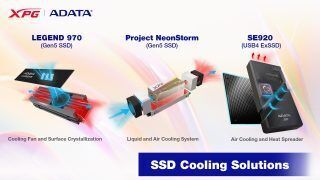
ADATA Technology has recently unveiled a groundbreaking line of cooling solutions for PCIe Gen5 solid-state…
May 30, 2023
WhatsApp has introduced three new features designed to make group chats more useful and easier…
Aug 9, 2026
Akbayan Party-list Rep. Chel Diokno has renewed efforts to create a national framework for artificial…
Aug 9, 2026
REDMI officially launched the REDMI 17 and REDMI 17 5G in global markets. The REDMI…
Aug 9, 2026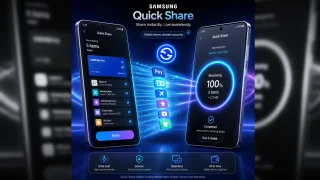
Samsung has added a new feature to Quick Share, allowing users to send items from…
Aug 9, 2026
We’ve all been here before. You’re transferring a file from your Windows computer to your…
Oct 8, 2018But all our lives, we know that the best practice for this, is to find the 'Safely Remove Hardware' or 'Eject' button in the task bar before removing our external media. However, the 'Safely Remove Hardware' option can show you a pop-up that says the drive is still in use, and to close all programs before removing it.
At this point, it's a matter of "better safe than sorry", so if you aren't fond of hitting 'Safely Remove Hardware', then the least you can do is close all programs or windows that directly involve your external drive.
Our coverage of hardware includes: "ADATA debuts its comprehensive SSD cooling solutions"; "WhatsApp adds new features to improve group chats"; "House bill seeks new rules for AI use in the Philippines". Each article provides unique insights and information.