


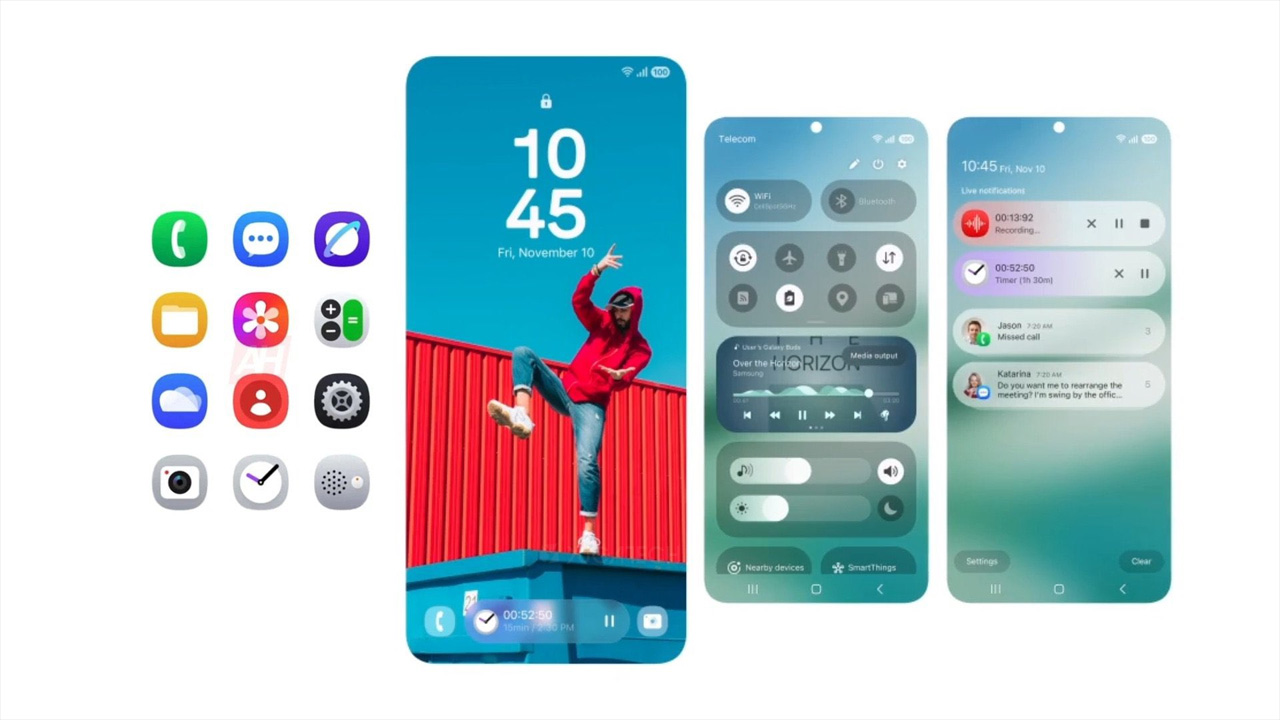
Before you keep reading, I should note that the entirety of features included with the update may vary between devices. In light of that, we'll only be naming some of our favorite features that you should check out. Lock Screen (Now Bar) One of the biggest changes that came with One UI 7 can be found on the lock screen. It’s so easy to manage since most of us hold our phones vertically with one hand. Gone are the days of having to go to your home screen to get this sorted. For example, you can pin your favorite quote or image of your loved one to your home screen if you wanted to. [gallery columns="2" size="full" link="none" ids="395238,395240" orderby="rand"] The clock has some pretty neat changes too. Apps & Home Screen Upgrades For the home screen, users will notice that the app icons have gone through cosmetic changes. Read more in our articles including "Our Favorite Samsung One UI 7 Features" and "Samsung Rolls Out One UI 7 with Android 15 to Galaxy S24 FE, S22 Series, and S21 Series".

Today, we’re here covering One UI 7. Some if its highlights include a cleaner look…
May 6, 2025
Samsung is accelerating its software update game, rolling out the much-anticipated One UI 7 update…
Apr 30, 2025
The Samsung One UI rollout has begun, starting with the Galaxy S24 series, Galaxy Z…
Apr 8, 2025
If there’s one thing Android users love, it’s the capability to craft one’s experiences based…
Feb 6, 2025
Samsung’s One UI 7, faced with many delays, is now likely to finally begin its…
Nov 23, 2024After over two weeks of using the iPhone 3G, I can fairly say I have…
Sep 13, 2008Before you keep reading, I should note that the entirety of features included with the update may vary between devices. In light of that, we'll only be naming some of our favorite features that you should check out.
Lock Screen (Now Bar) One of the biggest changes that came with One UI 7 can be found on the lock screen. It’s so easy to manage since most of us hold our phones vertically with one hand. Gone are the days of having to go to your home screen to get this sorted.
Our coverage of One UI 7 features includes: "Our Favorite Samsung One UI 7 Features"; "Samsung Rolls Out One UI 7 with Android 15 to Galaxy S24 FE, S22 Series, and S21 Series"; "Samsung One UI 7 rollout has begun". Each article provides unique insights and information.