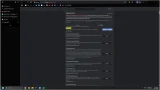

The update includes vertical tabs and a new fullscreen reading mode for desktop users. The vertical tabs feature allows users to move their tabs from the top of the screen to the left side. Google is taking another step toward bringing vertical tabs to Chrome, with the long-requested feature now appearing in the browser’s Beta channel. After first being spotted in early desktop Canary builds last year, vertical tabs are now available to a wider group of testers, signaling that the feature is inching closer to a full public rollout. Vertical tabs are currently hidden behind a flag in Chrome Beta version 145. Users who want to try it out can enable the feature by heading to chrome://flags/#vertical-tabs, setting it to “Enabled,” and restarting the browser. Early testers have also confirmed that Tab Groups work properly in the vertical layout, allowing users to keep related tabs grouped together even when placed on the side. Some users report missing behaviors found in rival browsers, such as expanded previews when hovering over collapsed tabs. Read more in our articles including "Google Chrome adds Vertical Tabs and new Reading Mode" and "Google Begins Testing Vertical Tabs in Chrome Beta".

Google is rolling out new features for its Google Chrome that aim to make browsing…
Apr 11, 2026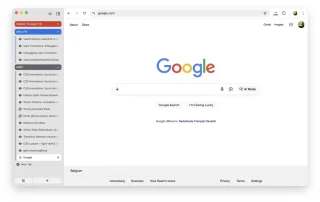
Google is taking another step toward bringing vertical tabs to Chrome, with the long-requested feature…
Jan 18, 2026
Google has introduced Disco, a lightweight, experimental browser from Google Labs designed to test new…
Dec 15, 2025
The Infinix AI Glasses Audio XGA01 just landed in the Philippines, bringing AI-powered features and…
Jul 15, 2026
AOC launches a 13.3-inch portable monitor that uses a color E Ink Kaleido 3 display…
Jul 15, 2026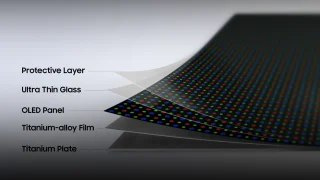
Ahead of its next Galaxy Unpacked event, Samsung reveals Flex Titanium, a new display technology…
Jul 15, 2026The update includes vertical tabs and a new fullscreen reading mode for desktop users. The vertical tabs feature allows users to move their tabs from the top of the screen to the left side.
Google is taking another step toward bringing vertical tabs to Chrome, with the long-requested feature now appearing in the browser’s Beta channel. After first being spotted in early desktop Canary builds last year, vertical tabs are now available to a wider group of testers, signaling that the feature is inching closer to a full public rollout. Vertical tabs are currently hidden behind a flag in Chrome Beta version 145.
Our coverage of vertical tabs browser includes: "Google Chrome adds Vertical Tabs and new Reading Mode"; "Google Begins Testing Vertical Tabs in Chrome Beta"; "Google unveils Disco, an experimental AI browser that turns tabs into mini apps". Each article provides unique insights and information.