
Google is taking another step toward bringing vertical tabs to Chrome, with the long-requested feature now appearing in the browser’s Beta channel. After first being spotted in early desktop Canary builds last year, vertical tabs are now available to a wider group of testers, signaling that the feature is inching closer to a full public rollout.
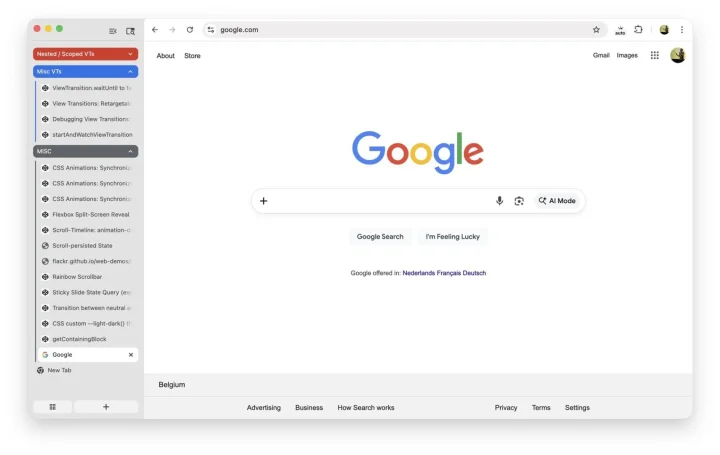
Vertical tabs are currently hidden behind a flag in Chrome Beta version 145. Users who want to try it out can enable the feature by heading to chrome://flags/#vertical-tabs, setting it to “Enabled,” and restarting the browser. Once activated, tabs can be moved from the traditional top bar to a sidebar by right-clicking the tab strip and selecting the new option.
Instead of introducing a brand-new interface, Chrome’s implementation adjusts how Android apps and websites are displayed by prompting them to render in a wider, tablet-style layout. The vertical tab sidebar itself is resizable and can be collapsed into a compact mode, making it more flexible for users who want to balance screen space and organization. Early testers have also confirmed that Tab Groups work properly in the vertical layout, allowing users to keep related tabs grouped together even when placed on the side.
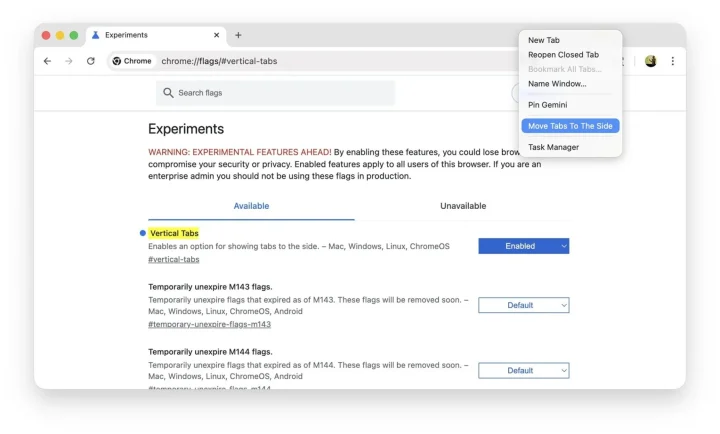
Chrome also appears to be adding another way to access the feature. Some Beta users have spotted a new “Tab strip position” option under Settings > Appearance, offering a more straightforward toggle for moving tabs to the side without relying on flags.
While the feature is functional, it’s still clearly a work in progress. Some users report missing behaviors found in rival browsers, such as expanded previews when hovering over collapsed tabs. Still, the move to Beta suggests Google is refining the experience and preparing it for broader use.
Google has not announced when vertical tabs will roll out to the stable version of Chrome, but their arrival in Beta typically indicates that wider availability is only a matter of time.







0 Comments
Leave a Reply