

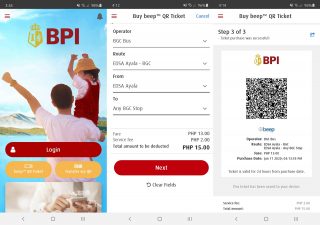
In the case of Beep, you can now go cardless and purchase Beep QR tickets straight from the BPI Mobile app. On your BPI Mobile app, go to "Payments/Load." You can also just tap on the Beep QR Ticket button on the login screen. Choose "Buy Beep QR ticket." Choose the account you wish to use. Choose your "Route", "Source Location", and "Destination." Review the details, and click "Confirm." Enter your One-Time-PIN (OTP) then select "Submit." The app can only generate one ticket per transaction. If you wish to generate another ticket, just tap "Buy another ticket" after every transaction. The Beep QR ticket is only valid within 24 hours from the date and time of purchase. You can take a screenshot to have a copy of your ticket, or change the settings from your phone so that your Beep QR will be automatically saved in your gallery. has announced that QR ticket acceptance is going live in four partner bus lines, namely, BGC Bus, TAS Trans, Precious Grace Transport Services, and San Agustin Transport. Read more in our articles including "How to buy Beep QR Ticket with BPI Mobile App" and "beep expands prepaid QR ticketing in select bus lines".
More and more people will start moving around for work and business as travel restrictions…
Jun 11, 2020
beep operator AF Payments Inc. has announced that QR ticket acceptance is going live in…
Feb 7, 2022
Paymaya adds a new feature in its app that allows commuters to purchase QR and…
Dec 3, 2020AF Payments Inc. have just announced that BGC Buses are now also using the beep™…
Jun 16, 2016AF Payments Inc. recently announced that you can use the “beep” card for cashless payments…
Sep 25, 2015
The Land Transportation Office (LTO) has raised concerns over the future of its Land Transportation…
Jun 21, 2026In the case of Beep, you can now go cardless and purchase Beep QR tickets straight from the BPI Mobile app. On your BPI Mobile app, go to "Payments/Load." You can also just tap on the Beep QR Ticket button on the login screen.
Choose "Buy Beep QR ticket." Choose the account you wish to use. Choose your "Route", "Source Location", and "Destination." Review the details, and click "Confirm." Enter your One-Time-PIN (OTP) then select "Submit." The app can only generate one ticket per transaction. If you wish to generate another ticket, just tap "Buy another ticket" after every transaction.
Our coverage of beep qr ticket includes: "How to buy Beep QR Ticket with BPI Mobile App"; "beep expands prepaid QR ticketing in select bus lines"; "PayMaya now supports beep QR, other travel tickets". Each article provides unique insights and information.