
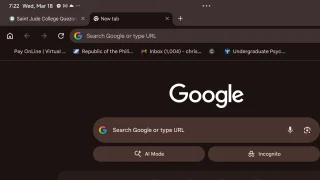
Google is updating Google Chrome on Android tablets and foldables with a new bookmarks bar, bringing the experience closer to desktop. The bookmarks bar appears below the address bar and spans the full width of the screen, showing saved sites with both icons and labels. Users can enable it by going to Settings > Appearance > Show bookmarks bar. The new android version also introduces a new taskbar that allows users to switch between different apps. Read more in our articles including "Chrome on Android tablets, foldables now gets bookmarks bar" and "Google previews Android 12L for tablets, foldables, ChromeOS devices".
Google is updating Google Chrome on Android tablets and foldables with a new bookmarks bar,…
Mar 18, 2026
Google has just announced a new version of Android 12 that is catered to larger…
Oct 28, 2021Maybe this is what Google wanted all along — for every small-time phone manufacturer not…
Dec 5, 2008
Apple Pay is now available in the Philippines. Initial issuing banks include GoTyme, MetroBank, Union…
Aug 4, 2026
Google axes AI Studio app before official launch. Google AI Studio has announced that it…
Aug 4, 2026
Samsung has announced that Prime Video will be the first streaming service to support HDR10+…
Aug 4, 2026Google is updating Google Chrome on Android tablets and foldables with a new bookmarks bar, bringing the experience closer to desktop. The bookmarks bar appears below the address bar and spans the full width of the screen, showing saved sites with both icons and labels.
Users can enable it by going to Settings > Appearance > Show bookmarks bar. The new android version also introduces a new taskbar that allows users to switch between different apps.
Our coverage of bookmarks bar Android includes: "Chrome on Android tablets, foldables now gets bookmarks bar"; "Google previews Android 12L for tablets, foldables, ChromeOS devices"; "Sciphone goes for Android Dream 2". Each article provides unique insights and information.