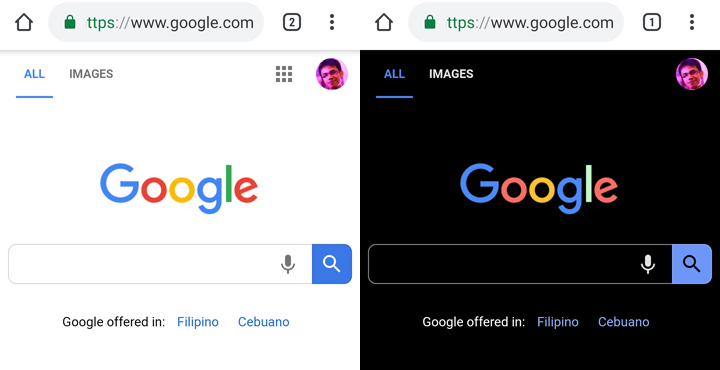

Google has silently implemented the Dark Mode feature for its Chrome browser in Android. The Dark Mode feature for Google Chrome Mobile is still at an experimental phase so expect that enabling it will take unusual steps to go to it. Press on the "default" option on the Android Web Contents dark mode and Android Chrome UI dark mode and choose "Enabled" Restart the Chrome app and you'll be greeted with a dark interface. You will still know the difference of the dark mode and the Incognito mode of the browser as the latter have a Gray-colored background while the former has a pitch black color. Read more in our articles including "You can now enable Dark Mode for Google Chrome in Android" and "Best Budget Tablets for Back-to-School 2026 | Under P10,000".

Google has silently implemented the Dark Mode feature for its Chrome browser in Android. Read…
Apr 28, 2019
A new school year means new projects, research papers, presentations, and online learning tasks. Whether…
Jun 14, 2026
With the announcement of the Xiaomi 17T series today, those hoping to upgrade from last…
May 29, 2026
Inflation is now (May 2026) at 7.2%, electricity rates at Php14.33/kWhr, and gas prices through…
May 28, 2026
GCash has expanded its in-app help tools and security features to address a growing number…
May 22, 2026
Smartphones today can handle all the basics. The real difference now is how well a…
Apr 30, 2026Google has silently implemented the Dark Mode feature for its Chrome browser in Android. The Dark Mode feature for Google Chrome Mobile is still at an experimental phase so expect that enabling it will take unusual steps to go to it.
Press on the "default" option on the Android Web Contents dark mode and Android Chrome UI dark mode and choose "Enabled" Restart the Chrome app and you'll be greeted with a dark interface. You will still know the difference of the dark mode and the Incognito mode of the browser as the latter have a Gray-colored background while the former has a pitch black color.
Our coverage of Dark Mode Everything includes: "You can now enable Dark Mode for Google Chrome in Android"; "Best Budget Tablets for Back-to-School 2026 | Under P10,000"; "Xiaomi 17T vs. Xiaomi 15T, what's different?". Each article provides unique insights and information.