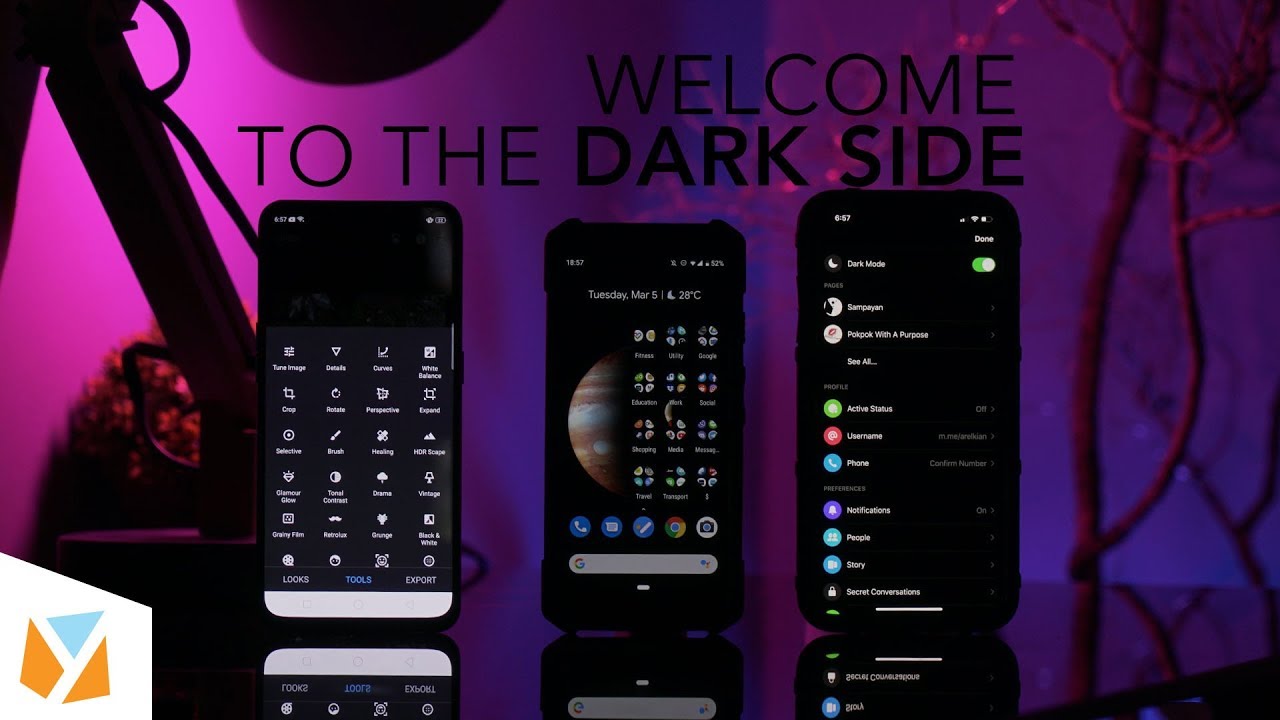

Don’t you wish you could make your entire smartphone interface dark mode? There are so many reasons why you should use dark mode for your phone. And although there are now more dark modes available for different apps and even phones, there are still some limitations to the feature that it doesn’t make everything totally pitch black or dark blue. Either way, if you’re an iPhone or Android user, here are some ways you can turn your device dark. Starting with some most used apps that already have a dark feature on board. Unfortunately, Facebook still doesn’t have it, however, if you still haven’t unlocked the dark mode in your Messenger app, just send the crescent moon emoji to anyone. Then there are apps that are already in dark mode by default, so I guess it’s not “mode” per se. If you want dark mode for your entire iPhone’s UI, thankfully with iOS 13 you can now simply go to Settings, then Display and Brightness, and at the top part click on Dark. Read more in our articles including "Dark Mode Everything for Android and iOS" and "Xiaomi Ecosystem: It just works, too".
Don’t you wish you could make your entire smartphone interface dark mode? There are so…
Apr 16, 2020
We all know that Apple and its closed ecosystem is arguably THE best one out…
Aug 1, 2026
We’ve spent weeks using the HONOR 600 Series as our daily drivers to get a…
Jul 23, 2026
So, you just got a shiny new phone, and what’s exactly the first thing you’d…
Jul 23, 2026
It seems like it was only yesterday when 2026 started, but now we’re already halfway…
Jul 12, 2026
With June quickly coming to a close, we think it’s time to look back and…
Jul 12, 2026Don’t you wish you could make your entire smartphone interface dark mode? There are so many reasons why you should use dark mode for your phone.
And although there are now more dark modes available for different apps and even phones, there are still some limitations to the feature that it doesn’t make everything totally pitch black or dark blue. Either way, if you’re an iPhone or Android user, here are some ways you can turn your device dark. Starting with some most used apps that already have a dark feature on board.
Our coverage of dark mode fb includes: "Dark Mode Everything for Android and iOS"; "Xiaomi Ecosystem: It just works, too"; "HONOR MagicOS 10: Tips & Tricks". Each article provides unique insights and information.