

Google has begun rolling out a new "Delete All Data" feature within its Password Manager, allowing users to mass-delete saved passwords and passkeys efficiently. Currently, this feature is available to users running beta versions of Google Play Services, specifically versions 25.09.60 and 25.10.31. To access the feature, users can navigate to the Password Manager settings, where the "Delete All Data" option is located beneath the import and export passwords settings. Prior to this update, deleting all saved credentials required users to clear all browsing data, a method that also removed browsing history, autofill form data, and site settings. The new "Delete All Data" option provides a more targeted approach, enabling users to manage their credentials without affecting other browser data. While the "Delete All Data" feature is currently limited to beta users, a broader rollout is anticipated in the coming weeks. Previously, the only way to replace music is to delete and re-upload the content, wiping out all the likes, comments, and shares in the process. Roblox is shutting down Roblox Connect, its avatar-based video calling feature introduced in 2023, according to a report by The Verge. Read more in our articles including "New ‘Delete All Data’ Feature Arrives in Google Password Manager" and "Instagram finally brings Replace Audio feature for old posts".

Google has begun rolling out a new “Delete All Data” feature within its Password Manager,…
Mar 13, 2025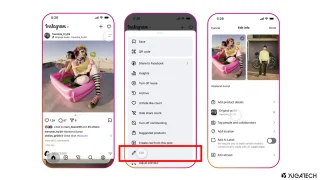
Instagram finally lets its users replace the background music for published posts and carousels without…
Jul 22, 2026
Roblox is shutting down Roblox Connect, its avatar-based video calling feature introduced in 2023, according…
Jul 16, 2026Someone sent me a link to this old article from Manila Standard Today about me…
May 14, 2006Update: Go check out our list of Call Center Job openings here! If you are…
Jul 13, 2005
POCO has officially announced the POCO M8 Power, doubling down on battery life as the…
Aug 5, 2026Google has begun rolling out a new "Delete All Data" feature within its Password Manager, allowing users to mass-delete saved passwords and passkeys efficiently. Currently, this feature is available to users running beta versions of Google Play Services, specifically versions 25.09.60 and 25.10.31.
To access the feature, users can navigate to the Password Manager settings, where the "Delete All Data" option is located beneath the import and export passwords settings. Prior to this update, deleting all saved credentials required users to clear all browsing data, a method that also removed browsing history, autofill form data, and site settings. The new "Delete All Data" option provides a more targeted approach, enabling users to manage their credentials without affecting other browser data.
Our coverage of delete all data feature includes: "New ‘Delete All Data’ Feature Arrives in Google Password Manager"; "Instagram finally brings Replace Audio feature for old posts"; "Roblox to discontinue Connect video calling feature". Each article provides unique insights and information.