
To play the game, it's important to first update your Facebook Messenger app. It will now direct you to a gaming page where you can start playing. After playing a few tries, here's our current top score. This is a new feature that creates personalized playlists for running based on a user's workout goals, preferred music and running pace. Spotify then generates a playlist that matches the chosen pace. Spotify said Running Mode is designed to make it easier for users to find music that matches their workouts without creating playlists manually. These include the Redmi Buds 6 Pro, Xiaomi Focus Pen Pro for the tablet, and also the Xiaomi Sound Play. All your active connected devices show up here on your phone, tablet, and even on the smartwatch. Read more in our articles including "There's a new game in Facebook Messenger and here's how to play it" and "Spotify launches Running Mode feature".
Most of us got hooked to the basketball mini game that Facebook Messenger previously integrated…
Jun 16, 2016
Spotify has launched Running Mode. This is a new feature that creates personalized playlists for…
Aug 2, 2026
We all know that Apple and its closed ecosystem is arguably THE best one out…
Aug 1, 2026
What’s new in Geekbench 7 New media workloads for AV1 video encoding, Opus audio compression,…
Jul 27, 2026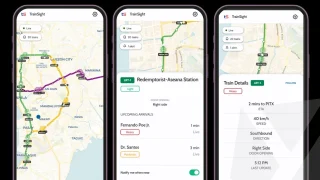
A new app called TrainSight aims to make commuting in Metro Manila more convenient by…
Jul 27, 2026
OpenAI has made Health in ChatGPT widely available in the United States, allowing users to…
Jul 25, 2026To play the game, it's important to first update your Facebook Messenger app. It will now direct you to a gaming page where you can start playing.
After playing a few tries, here's our current top score. This is a new feature that creates personalized playlists for running based on a user's workout goals, preferred music and running pace. Spotify then generates a playlist that matches the chosen pace.
Our coverage of how to play includes: "There's a new game in Facebook Messenger and here's how to play it"; "Spotify launches Running Mode feature"; "Xiaomi Ecosystem: It just works, too". Each article provides unique insights and information.