

Oculus has announced to roll out a new feature that will be found in the v28 software update of their Oculus Quest headsets–the Oculus Air Link. Oculus Air Link is a wireless way to play PC VR games on Quest 2. With the Air Link, Oculus Quest 2 users would be able to do PC VR gaming via WiFi without the stress and tangles of a USB-C cable. However, as the Air Link is still in its early development phase, it will first be launched in experimental mode. In the meantime, here are the steps on how to use the Air Link once the v28 update out: 1. Beta in the PC app and enable the Air Link toggle. To disable Air Link and go back to using Link with a USB-C cable, you’ll need to disable Air Link from the Experimental panel. Meanwhile, according to the company, they will work on improving Air Link over time, including performance, visual quality, and the ability to run in less than ideal wireless scenarios. Read more in our articles including "Oculus announces Air Link for wireless gameplay on Quest 2" and "Blogger-Friendly Airports".

Oculus has announced to roll out a new feature that will be found in the…
Apr 14, 2021In my travels abroad in the last three years, I’ve gone thru dozens of airports…
Dec 7, 2008Apple today unveiled their smallest notebook so far — an 11.6″ Macbook Air weighing in…
Oct 21, 2010
After recently implementing significant price hikes, Apple Philippines has rolled out Education discounts for its…
Jul 18, 2026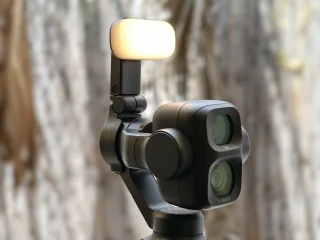
DJI’s Osmo Pocket series has long been one of the most popular options for creators…
Jul 14, 2026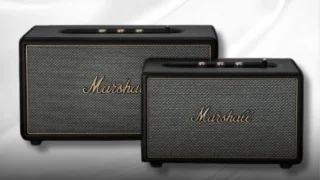
Marshall has introduced the new Acton IV and Stanmore IV home speakers, bringing updated features…
Jul 11, 2026Oculus has announced to roll out a new feature that will be found in the v28 software update of their Oculus Quest headsets–the Oculus Air Link. Oculus Air Link is a wireless way to play PC VR games on Quest 2.
With the Air Link, Oculus Quest 2 users would be able to do PC VR gaming via WiFi without the stress and tangles of a USB-C cable. However, as the Air Link is still in its early development phase, it will first be launched in experimental mode. In the meantime, here are the steps on how to use the Air Link once the v28 update out: 1.
Our coverage of Oculus Air Link includes: "Oculus announces Air Link for wireless gameplay on Quest 2"; "Blogger-Friendly Airports"; "Apple introduces 11.6" Macbook Air". Each article provides unique insights and information.