

PayMaya recently rolled out its crypto services inside the app, allowing users of the popular e-wallet to easily buy and sell cryptocurrencies. Once updated, launch the PayMaya app and you will see the "Crypto" icon marked as "new" or "beta." How to buy: 1) Tap Crypto on the PayMaya homepage to be brought to your crypto portfolio. 2) Tap Buy on the bottom of the screen, then select the desired cryptocurrency. How to sell: 1) Tap Crypto on the PayMaya homepage. Fortunately, the PayMaya crypto section already offers guides and news on the crypto space to keep you informed. Read more in our articles including "How to buy and sell cryptocurrency on PayMaya" and "Forgot to buy a Valentine’s Gift? Here’s how to pull it off before the 14th!".
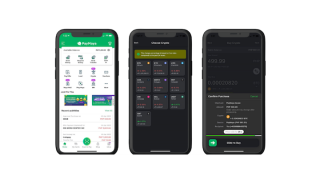
PayMaya recently rolled out its crypto services inside the app, allowing users of the popular…
Apr 9, 2022
Forgot to buy a Valentine’s Gift? Here’s how to pull it off before the 14th!…
Feb 11, 2026How to activate GPRS for Globe and TM (Touch Mobile) For a complete listing of…
Jun 10, 2011
We all know that Apple and its closed ecosystem is arguably THE best one out…
Aug 1, 2026
We’ve spent weeks using the HONOR 600 Series as our daily drivers to get a…
Jul 23, 2026
So, you just got a shiny new phone, and what’s exactly the first thing you’d…
Jul 23, 2026PayMaya recently rolled out its crypto services inside the app, allowing users of the popular e-wallet to easily buy and sell cryptocurrencies. Once updated, launch the PayMaya app and you will see the "Crypto" icon marked as "new" or "beta." How to buy: 1) Tap Crypto on the PayMaya homepage to be brought to your crypto portfolio.
2) Tap Buy on the bottom of the screen, then select the desired cryptocurrency. How to sell: 1) Tap Crypto on the PayMaya homepage. Fortunately, the PayMaya crypto section already offers guides and news on the crypto space to keep you informed.
Our coverage of paymaya crypto how to buy includes: "How to buy and sell cryptocurrency on PayMaya"; "Forgot to buy a Valentine’s Gift? Here’s how to pull it off before the 14th!"; "How to activate Globe GPRS". Each article provides unique insights and information.