

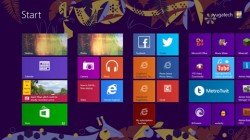
Today, we've decided to give you not a list of new features but instead, our experiences with Windows 8. It's true that Windows 8 is designed for the touch, but to be honest, if we didn't view any tutorials on how to use the new OS, we would be so lost in the touch interface. We had an easier time learning Windows 8 with the help of a trackpad/mouse. It looks clean but gone is the option to have more than two windows open. There is so much to cover, but I'd wanted to give only a quick glimpse as I have never really went deep into Windows 8 before. I had this experience with the Samsung Series 5 Ultra, so I had the chance to witness the touchscreen and the trackpad's role in Windows 8. We would not appreciate Windows 8 without the touchscreen, and we wouldn't learn it as easily without the trackpad/mouse and the keyboard. Truly, we have mixed emotions about Windows 8. Read more in our articles including "48 Hours with Windows 8" and "Windows 7 Preview: Less of the Same".
Microsoft’s new OS has been out for quite a while and ever since, people had…
Dec 11, 2012I’ve had the beta version of Windows 7 installed on my Intel Core 2 Quad,…
Jan 15, 2009Microsoft has finally announced the SKUs of their upcoming OS, Windows 7. The line-up didn’t…
Feb 4, 2009
Remember “phablets”? Back in the early-to-mid 2010s, phones with screens over 5.5 inches, bigger than…
Aug 6, 2026
The Canon EOS R6 V marks a new chapter in Canon’s video-first full-frame mirrorless lineup.…
Aug 4, 2026Today, we've decided to give you not a list of new features but instead, our experiences with Windows 8. It's true that Windows 8 is designed for the touch, but to be honest, if we didn't view any tutorials on how to use the new OS, we would be so lost in the touch interface.
We had an easier time learning Windows 8 with the help of a trackpad/mouse. It looks clean but gone is the option to have more than two windows open. There is so much to cover, but I'd wanted to give only a quick glimpse as I have never really went deep into Windows 8 before.
Our coverage of windows 8 hands on includes: "48 Hours with Windows 8"; "Windows 7 Preview: Less of the Same"; "The 6 flavors of Windows 7". Each article provides unique insights and information.