
Back in March, HP Philippines launched the Spectre x2 in the country which is a notebook with a detachable design similar to the popular Microsoft Surface. The model we have sported a 12.3-inch 3K display, 7th-gen Intel Core processor, 8GB RAM, and 256GB SSD. Let's find out what it is capable of in our review.

डिज़ाइन और निर्माण
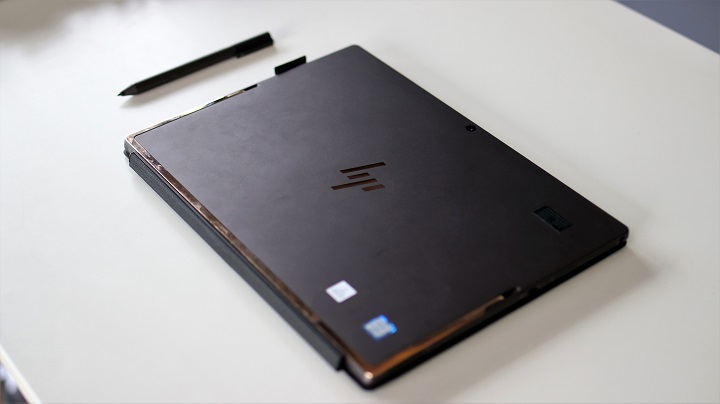
तुरंत ही हम बता सकते हैं कि HP Spectre x2 एक सुडौल लैपटॉप है। यह माइक्रोसॉफ्ट सरफेस प्रो के समान डिज़ाइन का उपयोग करता है, जिसमें एक डिटैचेबल कीबोर्ड और पीछे एक स्टैंड है।
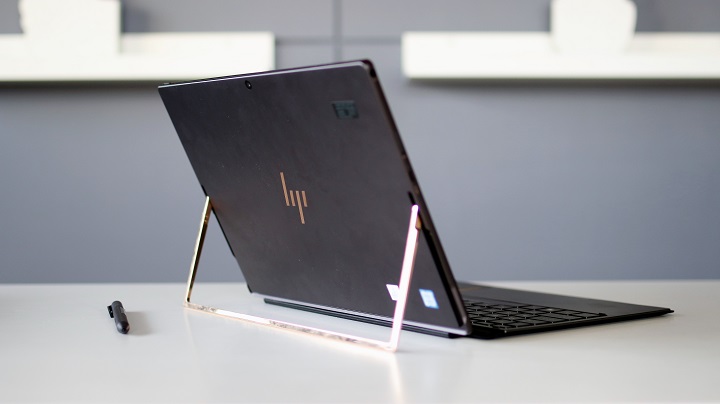
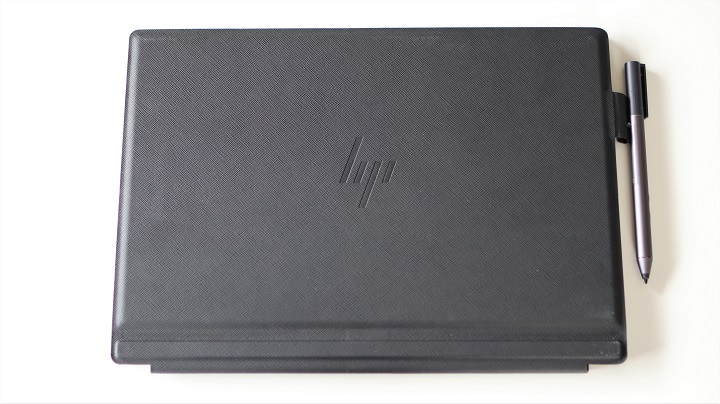
स्पेक्टर x2 भी आकर्षक है क्योंकि इसमें उपयोग किए गए रंग और सामग्री - डार्क ऐश सिल्वर मैट फिनिश के साथ और किकस्टैंड व एक्सेंट्स के लिए कॉपर रंग, जो पहली नज़र में सोने जैसा दिखता है। बॉडी एल्यूमिनियम से बनी है, जबकि किकस्टैंड स्टेनलेस स्टील से बना है। कीबोर्ड बेस, दूसरी ओर, भी एल्यूमिनियम से बना है और उसके नीचे एक फ़ॉक्स लेदर कवर है।
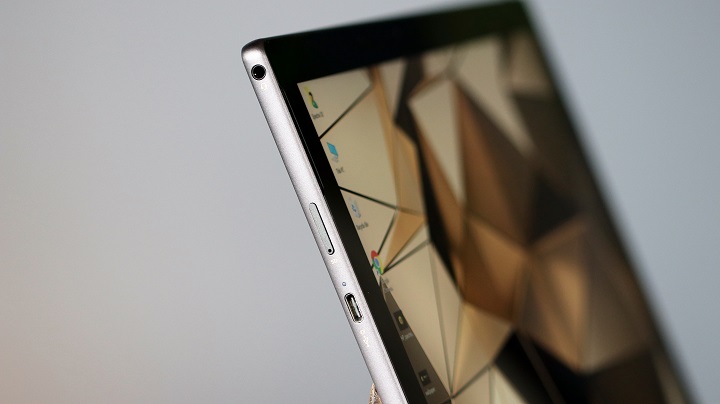
The notebook itself is pretty minimalistic with two USB 3.1 Type-C ports on the left and right which also functions as the charging ports which are cool. It also has a microSD card tray, 3.5mm audio port, two front-facing speakers, a 5MP webcam with dual array digital microphones, power button and volume keys that are quiet but with good tactility.

When in use, the Spectre x2 relies heavily on the kickstand which can rotate up to 165-degrees. It's easily adjustable but firm and stable. When placed on a flat surface like a table, it doesn't' wobble whenever we type or sketch on it. It feels weird though when placed on the lap but so far it's stable as long as you angle the kickstand properly.

यदि आप अपनी उत्पादकता बढ़ाना चाहते हैं, तो आप Spectre x2 को कीबोर्ड पर डॉकर कर सकते हैं जो धातु पिनों के माध्यम से जुड़ता है और एक मजबूत चुंबक द्वारा सुरक्षित रहता है। यह टैबलेट को उठाते समय आसानी से नहीं गिरता, जो अच्छा है। कुंजियों में बैकलाइट है लेकिन चमक को समायोजित नहीं किया जा सकता। वे शांत हैं और उचित यात्रा और स्पेसिंग के साथ आते हैं। इसका झुकाव होने के कारण टाइप करना भी आरामदायक है।

टचपैड स्मूथ और रिस्पॉन्सिव है, साथ ही क्लिक करने वाले बटन भी हैं। इसकी ऊँचाई अधिक नहीं है लेकिन यह स्क्रीन पर पॉइंटर को दिशा देने के लिए पर्याप्त चौड़ा है, जबकि हथेली के लिए पर्याप्त जगह भी छोड़ता है।

उत्पादकता की बात करें तो, दो USB Type-C पोर्ट किसी ऐसे व्यक्ति के लिए पर्याप्त नहीं हैं जिसे कई पेरिफेरल्स को जोड़ना हो। अच्छी बात यह है कि HP ने USB-C से USB-A एडेप्टर और एक USB-C से मल्टी-पोर्ट हब शामिल किया है, जिसमें डेटा और चार्जिंग के लिए USB-C पोर्ट, HDMI, और USB-A शामिल हैं।

पोर्टेबिलिटी की बात करें तो, Spectre x2 को ले जाना आसान है। कीबोर्ड सहित 1.13Kg वजन के साथ, यह बहुत भारी नहीं है। यह पतला भी है और एक छोटे बैकपैक में फिट हो जाएगा। HP ने सुरक्षा के लिए एक लेदर स्लीव भी शामिल की है।
डिस्प्ले और मल्टीमीडिया
HP Spectre x2 में 12.3‑इंच IPS डिस्प्ले 3000 x 2000 रिज़ॉल्यूशन के साथ लगा है। यह रिज़ॉल्यूशन हमारे द्वारा उपयोग किए जाने वाले सभी एप्लिकेशन के लिए पर्याप्त है। देखने के कोण व्यापक हैं और रंग सटीक हैं। पैनल इतना उज्ज्वल भी है कि चमक को रोकता है और इसमें अनुकूली चमक भी है। कुल मिलाकर, यह Spectre x2 फोटो देखने और फ़िल्में देखने के लिए एक अच्छा डिवाइस बनाता है।

फ़िल्मों की बात करें तो, Spectre x2 में दो फ्रंट‑फ़ायरिंग स्पीकर हैं जो बाएँ और दाएँ पक्षों पर स्थित हैं। इन्हें Bang & Olufsen Audio द्वारा पावर किया गया है और इसमें ऑडियो सेटिंग्स को ट्यून करने के लिए एक विशेष सॉफ़्टवेयर शामिल है। यहाँ से, आप अपनी गतिविधि के अनुसार तीन मोड में से चुन सकते हैं: Music, Movie, और Voice। आप बास, ट्रेबल और डायलॉग स्पष्टता को मैन्युअल रूप से समायोजित कर सकते हैं तथा HP Noise Cancellation को चालू कर सकते हैं, जो आवाज़ या वीडियो कॉन्फ़्रेंस के लिए अच्छा है।
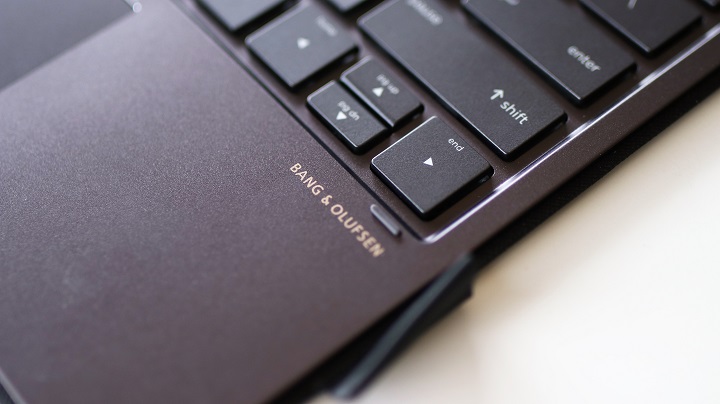
स्पीकर तेज़ और स्पष्ट हैं, उच्च वॉल्यूम पर न्यूनतम विरूपण के साथ। बास कमजोर है लेकिन हमारे संग्रह से वीडियो देखने, यूट्यूब पर और स्पॉटिफ़ाई पर संगीत स्ट्रीम करने के लिए यह पर्याप्त है। बेहतर ऑडियो अनुभव के लिए हम अभी भी हेडफ़ोन या बाहरी स्पीकर का उपयोग करने की सलाह देंगे।
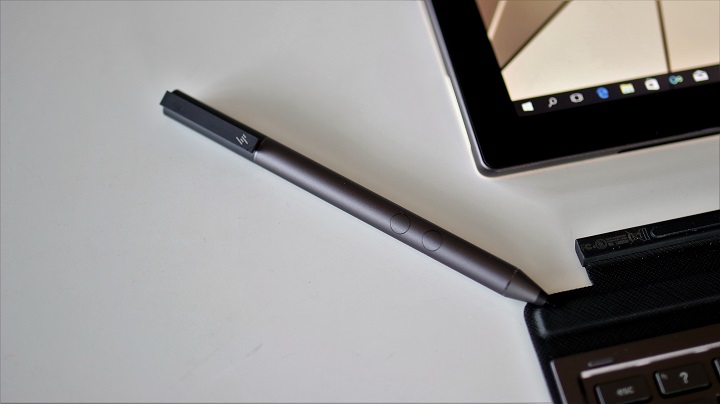
स्पेक्टर x2 की एक और विशेषता जो इसे एक अच्छे क्रिएटर डिवाइस बनाती है, वह है पैकेज में शामिल HP एक्टिव पेन। यह 1,024 स्तर तक के दबाव को पहचान सकता है, जो ठीक है लेकिन माइक्रोसॉफ्ट सरफेस प्रो के 4,096 स्तरों से बहुत दूर है। यह Windows इंक के साथ अच्छी तरह काम करता है और हम आसानी से डिजिटल रूप से दस्तावेज़ों को हाइलाइट कर सकते हैं और एनोटेशन जोड़ सकते हैं।
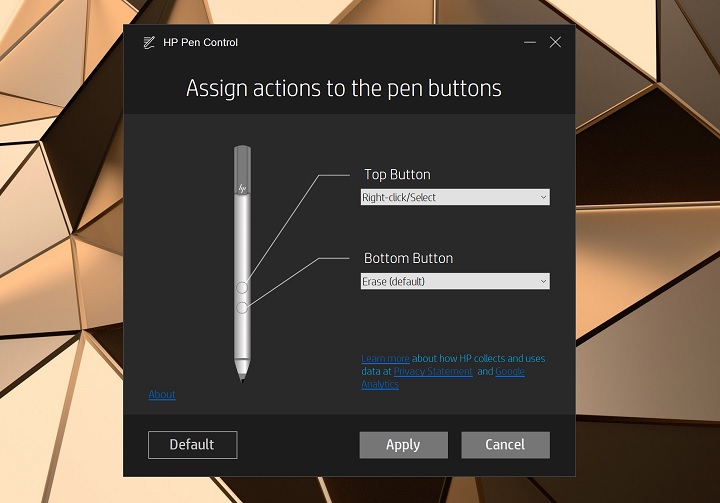
Doodling on MS Paint is not a problem as well, however, its limited latency is noticeable. There's a half-second delay when we're writing quickly or making a signature but, if you can do things a bit slowly, the pen will suffice for everyday use.
OS and Apps
The HP Spectre x2 runs on Windows 10 Home with version 1709 or the Fall Creators Update. It comes pre-installed with McAfee Live, Microsoft Office with a trial period, and a number of HP's own applications.
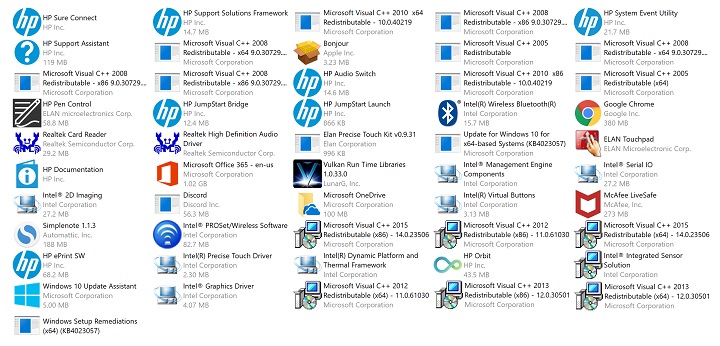
Our most favorite is HP Orbit which bridges the Spectre x2 with your phone. All you need to do is start HP Orbit on the Spectre x2, and download the HP Orbit app for Android or iOS. If both devices are connected to the same network, you can start the pairing mode. Once paired, you can start sending files from your PC to your phone and vice versa. It supports Office documents, photos, MP3 files, text messages or notes, even links or URLs. The setup is easy and you only have to initiate the pairing once.

Storage-wise, you're getting 256GB of SSD storage with 143GB as usable with 11.2GB saved for recovery. That's not a lot of space so it's recommended that you bring your portable HDD or install a sizeable microSD card to house your files.
Benchmarks and Performance
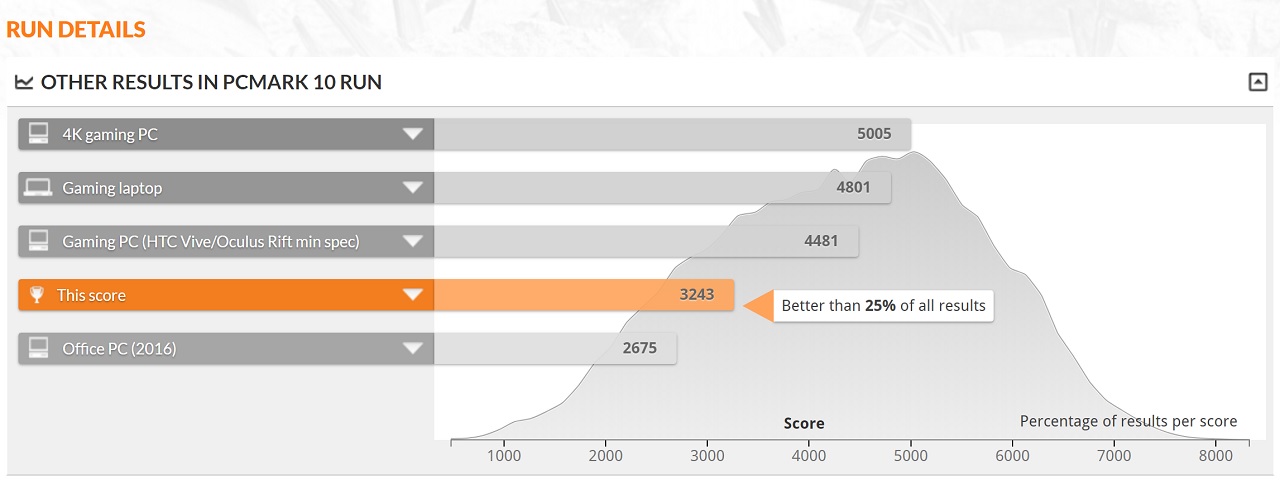
Powering the Spectre x2 is a 7th-gen Intel Core i5-7260U processor, Intel Iris Plus Graphics 640, and 8GB RAM. Performance is good for its class and had no issues running the software that we threw at it. We also didn't experience any crashes or random reboots.

If there's one thing we noticed about the Spectre X2 is that the backside can get really warm when charging or under heavy load. The CPU temperature topped at 67-degrees C when stressed, and settled around 42-degrees C in idle. Heat is dissipated by the exhaust located at the top of the tablet. It's quiet and can barely be heard even when the fans are cranked up.
Check out the benchmark scores below:



Battery Life
The Spectre x2 is equipped with a 4-cell, 41.58 Wh Li-ion which HP claims to last up to 8 hours. Our usage which involves heavy web browsing on Chrome with multiple tabs, including YouTube streaming, Word processing, some video playback, and photo editing, got us 3 hours on Best Performance mode in full brightness with keyboard lights on.
The same load at Better Battery mode in full brightness with keyboard lights off, got us 5 hours of life. Putting it in Best Battery mode at 70% brightness with keyboard lights off got us 7 hours of use. Based on that observation, you'll have to tone down some of its settings if you want to make its battery last longer. As for charging, it takes 2 hours and 30 minutes to charge from 0% to full.
Conclusion
The HP Spectre x2 is that kind of notebook designed for people who need to be productive yet want to do it in style. It's attractive, nicely crafted, and equipped with hardware powerful enough to run demanding applications. It's well-thought-out as well as HP acknowledged its limitations and addressed it by including the necessary accessories in the package. They even threw in the HP Active Pen which is a welcome accessory for artists. It's not perfect though, like its temperature when under load, pen sensitivity, and battery life. But considering the benefits mentioned, these are simple cons I can live with it.

The HP Spectre x2 base model starts at Php79,990 and is now available for purchase.
HP Spectre X2 12-c027TU specs:
12.3-inch 3K (3000 x 2000) LED IPS touchscreen display
7th-gen Intel Core i5-7260U 2.2GHz-3.4GHz Processor
Intel Iris Plus Graphics 640
8GB LPDDR3 RAM
256GB SSD
microSD card slot
WiFi 802.11a/b/g/n/ac
Bluetooth 4.2
HP Wide Vision 5MP Camera
Integrated dual array digital microphone
2x USB 3.1 Type-C Gen 1 (Data Transfer up to 5 Gb/s, Power Delivery, DP1.2, HP Sleep and Charge)
1 headphone/microphone combo
Full-size island-style backlit keyboard
HP Imagepad with multi-touch gesture support
HP Active Pen
Bang & Olufsen, dual speakers, HP Audio Boost
4-cell, 41.58 Wh Li-ion
Windows 10 Home
29.39 x 20.71 x 0.77 cm; 0.76 kg (tablet)
29.39 x 20.71 x 1.32 cm; 1.13 kg (tablet and base)
What we liked:
* Nice, high-resolution display
* Premium build
* Detachable design
* Good performance
* HP Active Pen
* USB-C adapters included in the package
* Comfortable keyboard
What we didn't:
* Can get really warm under load
* Below-average battery life


Lenovo Mix 530. Cheaper, same features.