

지난 주 Huawei 매트 30 시리즈 발표와 함께, Huawei가 Huawei 모바일 서비스라는 자체 모바일 플랫폼을 통해 지속할 것이라는 발표에 모두 놀랐습니다.
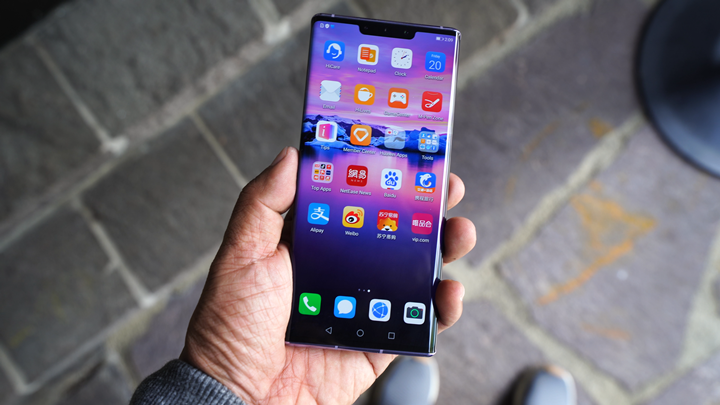
이것은 대부분의 Android 기기에서 사용되어 온 실질적인 대체자인 Google 모바일 서비스(GMS)를 대체하기 위한 것입니다. 잘 모르는 분들을 위해 말씀드리자면, Google 모바일 서비스(GMS)는 Google가 Android 운영체제와 라이선스를 통해 제공하는 서비스와 앱들입니다. 이 서비스에는 Google 플레이 서비스, Google 플레이 스토어, 그리고 구글 메일, Google 지도, 크롬, 유튜브 등의 앱 스택이 포함됩니다.
On the other hand, Huawei has an equivalent service -- the Huawei Mobile Services. This includes the Huawei AppGallery, Huawei Cloud, Huawei Themes, Huawei ID, Huawei Video and other Apps & Services. The AppGallery is basically the counterpart of the Google Play Store. This is already included in all Huawei devices as a complement to the Google Play Store. It's now a stand-alone service on the Mate 30 and Mate 30 Pro.
So, what the real deal with this new move? After talking to several Huawei executives and asking a lot of questions during the Q&A series, here are the answers we got.
Is Huawei shunning Google from now on?
Huawei loves to work with Google. Google likewise feels the same. However, the unpredictable trade ban by the US government has forced Huawei to take an independent path, one that does not rely on Google and its services. It's not closing its doors on Google though.
How about Android?
Android is an open-source mobile operating system (AOSP or Android Open Source Project) so anyone can actually use it. Huawei will continue to develop it and incorporate it into their own EMUI. This is not different from how Xiaomi has been doing their own OS, as well as the likes of OPPO (ColorOS), VIVO (FunTouch OS), RealMe and many others. We expect Emotion 10 Android OS to be developed even further as well as the succeeding versions.
Is Huawei sticking to Huawei Mobile Services as a complete replacement to Google Mobile Services?
In the foreseeable future, yes. As such, Huawei is investing billions of dollars to develop the AppGallery and bringing all 3rd-party apps into the fold.
Can we install Google Play Store ourselves?
Yes, you can. Each individual user has to do this themselves and Huawei will not provide any assistance nor support for this. It's quite easy though. Here's a tutorial we made on how to install Google Play Store on your Huawei Mate 30 Pro.
Huawei should not be seen as aiding any users from downloading and installing Google Play Services.
How about the other apps like YouTube, GMail, Maps and Chrome?
Well, if you installed the Google Play Store, then you can download all the apps you want.
Will all these apps be blocked by Google anyway?
Well, we don't know. However, we don't think Google will go to that extent in enforcing the ban. It only restricts Google from dealing with Huawei, not Huawei users.
Isn't it a hassle to go thru all these?
It's up to the individual users. The potential market of Mate 30 devices is the middle to upper-class segments so they are fairly good at understanding the issues and its implications. They're also more knowledgeable and open to doing the additional steps to get the Play Store in there.
How about my paid apps?
There are three scenarios here. One is that you are using an app or game that has in-app features -- meaning you buy virtual tokens. You will still be able to do so whether you get the app from the Google Play Store or the Huawei App Gallery. The second scenario is that you have a subscription service with an app or game. This will not be affected as well.
The 3rd scenario is you bought an app in the Google Play Store and when you moved to the Huawei Mate 30 Pro, you want to download the same app. If you download it in the Huawei AppGallery, you will have to pay for the app again. This is perhaps the biggest impact a user will experience.
Our takeaway.
There seem to be some feelings of uncertainty regarding Huawei's move away from Google Mobile Services and it does seem to have an impact. Regardless, it's a move that might only strengthen its position. It's another setback, but seeing how other big names like Xiaomi has endured this ordeal, we are certain Huawei can do the same.



I’ll add
NETFLIX,HULU, and other protected video services will not work on AOSP. They are using Google’s Widevine DRM