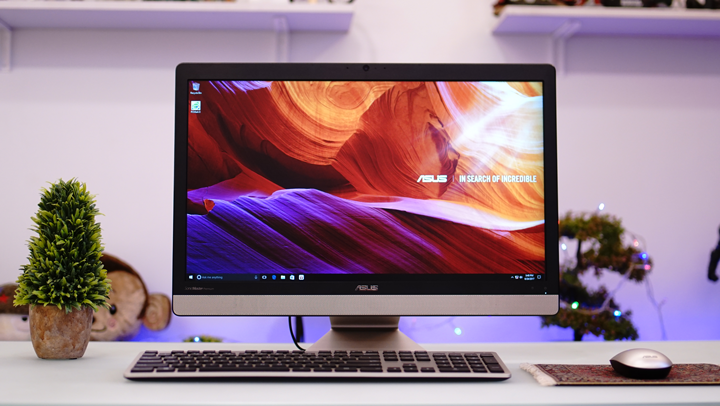

Find out what we think about the ASUS Vivo V221ICUK All-in-One PC in our review below. It sports a clean, simple metallic design with a very small footprint on your desk. Accounting for the stand, the overall depth is approximately 162mm when the screen is upright, about what you'd expect from an AIO or even a standalone computer monitor. We would have liked to see one or two more USB 2.0 ports for connecting basic peripherals such as keyboards and mice, which brings us to the left side of the PC. On the other side, however, are the very appropriately placed power button and headphone jack. The power button is big enough that you don't need to look to know where it is, and the headphone jack's location is very convenient for when you decide to use headphones. The mouse is not as aesthetically appealing as the keyboard, though, and looks very generic. It is quite small and will be uncomfortable for someone with larger hands. Read more in our articles including "ASUS Vivo V221ICUK All-in-One PC Review" and "Acer Chromebase AiO PC gets priced".
With its sleek Apple iMac-esque design and very conservative specs, this AIO from ASUS is…
Jun 28, 2017The latest All-in-One, Chrome-powered computers from Acer will be available in the US real soon.…
Jun 23, 2015ASUS also reveals its new lineup of All-in-One PCs that carry Intel’s CPU and NVIDIA’s…
Jun 1, 2015Along with the announcement of their latest mobile PC portfolio, Samsung and Asus also launched…
Nov 9, 2012
Point your iPhone camera at something and ask Siri about it. That is the new…
Jun 9, 2026After over two weeks of using the iPhone 3G, I can fairly say I have…
Sep 13, 2008Find out what we think about the ASUS Vivo V221ICUK All-in-One PC in our review below. It sports a clean, simple metallic design with a very small footprint on your desk.
Accounting for the stand, the overall depth is approximately 162mm when the screen is upright, about what you'd expect from an AIO or even a standalone computer monitor. We would have liked to see one or two more USB 2.0 ports for connecting basic peripherals such as keyboards and mice, which brings us to the left side of the PC. On the other side, however, are the very appropriately placed power button and headphone jack.
Our coverage of all in one includes: "ASUS Vivo V221ICUK All-in-One PC Review"; "Acer Chromebase AiO PC gets priced"; "ASUS reveals its Zen All-in-One PCs". Each article provides unique insights and information.