
Been receiving reports that the YugaTech iPhone App isn't working on the iPad. I have just tested this and found that the app crashes when opening individual posts. For the meantime, I don't recommend installing the YugaTech app on your iPad. Apple has loosened its grip on retro console emulators within the App Store. The updated App Store guidelines now permit these long-banned emulators, allowing those already availeble to Android to make their way onto iPhones. The games themselves must comply with "all applicable laws," implying that apps offering pirated titles would be essentially banned from the marketplace. Apple's update extends beyond emulators. The company has also revised its policies regarding "super apps" like WeChat. Read more in our articles including "Issues with YugaTech App on the iPad" and "Apple App Store now permits game emulators globally".
Been receiving reports that the YugaTech iPhone App isn’t working on the iPad. I have…
Apr 17, 2010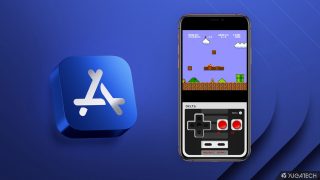
Apple has loosened its grip on retro console emulators within the App Store. This move…
Apr 6, 2024
Apple has revealed that the iPhone 12 and 12 mini now come in the color…
Apr 21, 2021
Apple has a reputation for making premium and expensive products– from accessories down to smart…
Aug 9, 2020
Apple released the iPhone SE 2020 last week. It’s Apple’s most affordable iPhone in its…
Apr 24, 2020
Apple has just announced its Independent Repair Provider Program, allowing companies interested in offering out-of-warranty…
Aug 30, 2019Been receiving reports that the YugaTech iPhone App isn't working on the iPad. I have just tested this and found that the app crashes when opening individual posts.
For the meantime, I don't recommend installing the YugaTech app on your iPad. Apple has loosened its grip on retro console emulators within the App Store. The updated App Store guidelines now permit these long-banned emulators, allowing those already availeble to Android to make their way onto iPhones.
Our coverage of App Troubleshooting includes: "Issues with YugaTech App on the iPad"; "Apple App Store now permits game emulators globally"; "Apple iPhone 12, 12 mini in Purple now official". Each article provides unique insights and information.