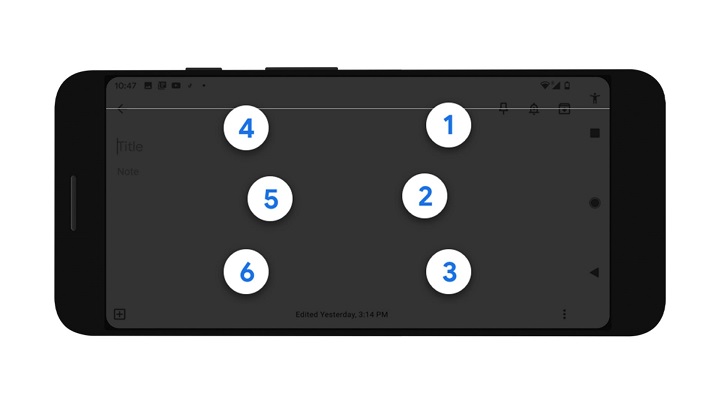

Google now offers a virtual braille keyboard for Android smartphones and tablets. Dubbed as TalkBack, the new feature makes the Android OS more accessible to people who are visually impaired. The TalkBack braille keyboard has a six-key layout. To activate the TalkBack braille keyboard, press both volume keys of your Android smartphone for three seconds or go to your device's setting and turn on TalkBack under Accessibility. From there, select Braille Keyboard and choose "Tap to set up". The TalkBack braille keyboard is initially available in English and supports braille grade 1 and grade 2 systems. For more information on setting up the braille keyboard, you visit this link. Read more in our articles including "Google launches braille keyboard for Android devices" and "Qualcomm announces dates for Snapdragon Summit 2026".
Google now offers a virtual braille keyboard for Android smartphones and tablets. Dubbed as TalkBack, the…
Apr 10, 2020
Qualcomm has announced that its annual Snapdragon Summit will take place from September 22 to…
Jun 30, 2026
HONOR Philippines has made the HONOR X7e available in the country through Lazada. The smartphone is…
Jun 30, 2026
Globe has officially launched Starlink’s satellite-to-mobile service in the Philippines after receiving approval from the…
Jun 30, 2026
DJI has officially launched the Osmo Pocket 4P in the Philippines, introducing a new handheld…
Jun 29, 2026
Senator Paolo Benigno “Bam” Aquino IV has rejected calls for a blanket ban on video…
Jun 29, 2026Google now offers a virtual braille keyboard for Android smartphones and tablets. Dubbed as TalkBack, the new feature makes the Android OS more accessible to people who are visually impaired. The TalkBack braille keyboard has a six-key layout.
To activate the TalkBack braille keyboard, press both volume keys of your Android smartphone for three seconds or go to your device's setting and turn on TalkBack under Accessibility. From there, select Braille Keyboard and choose "Tap to set up". The TalkBack braille keyboard is initially available in English and supports braille grade 1 and grade 2 systems.
Our coverage of Google braille keyboard includes: "Google launches braille keyboard for Android devices"; "Qualcomm announces dates for Snapdragon Summit 2026"; "HONOR X7e now available in the Philippines". Each article provides unique insights and information.