

Google Calendar has recently added a new feature that allows users to check their tasks on their mobile devices. Users may now create, view, and delete their tasks in Android and iOS versions of Google Calendar. All the tasks added to the calendar automatically syncs across desktop and mobile. Here's how to add a task to the Google Calendar from mobile: 1. On the left, under “My calendars,” make sure Tasks are checked. Click on an empty slot on the Google Calendar. The feature is now available on the Google Calendar app on iOS and Android devices. All GSuite customers and users with personal Google accounts may enjoy the feature. Read more in our articles including "Google Calendar allows users to view tasks on mobile devices" and "Google Shopping's AI try-on feature now available in the Philippines".

Google Calendar has recently added a new feature that allows users to check their tasks…
Oct 5, 2020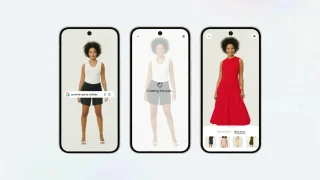
Google has launched its AI-powered Try On feature, allowing users to upload a photo and…
Jun 6, 2026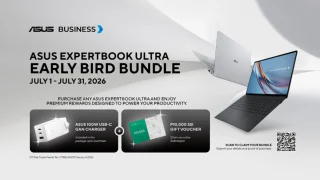
ASUS Business Philippines has launched its “ExpertBook Ultra Beats Murphy’s Law” campaign. The campaign highlights…
Jul 21, 2026
TCL has launched the C7L series in the Philippines. It is a new Mini LED…
Jul 21, 2026
Globe has launched Globe Cloud. It is a new cloud storage service that lets users…
Jul 21, 2026There was some sort of mass panic last night when Google was spewing a warning…
Feb 1, 2009Google Calendar has recently added a new feature that allows users to check their tasks on their mobile devices. Users may now create, view, and delete their tasks in Android and iOS versions of Google Calendar.
All the tasks added to the calendar automatically syncs across desktop and mobile. Here's how to add a task to the Google Calendar from mobile: 1. On the left, under “My calendars,” make sure Tasks are checked.
Our coverage of Google Calendar task feature includes: "Google Calendar allows users to view tasks on mobile devices"; "Google Shopping's AI try-on feature now available in the Philippines"; "ASUS unveils ExpertBook Ultra campaign in the Philippines". Each article provides unique insights and information.