

WhatsApp users will now be able to edit their messages. Users who want to edit one of their WhatsApp messages can do so by long-pressing on a sent message and choosing the 'Edit' option from the menu. Edited messages will display the label 'edited' alongside them. These edited messages, along with all the other messages, media, and calls within WhatsApp continue to be protected by end-to-end encryption. Read more in our articles including "WhatsApp messages can now be edited" and "How to activate Globe GPRS".
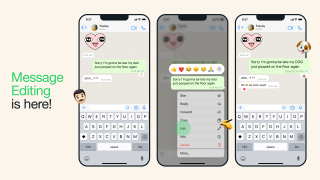
WhatsApp users will now be able to edit their messages. Users who want to edit…
May 23, 2023How to activate GPRS for Globe and TM (Touch Mobile) For a complete listing of…
Jun 10, 2011
After being spotted in Lazada, the Infinix HOT 70 is now available in the Philippines.…
Jun 24, 2026
Apple has released the second developer beta of iOS 27. It brings several new features…
Jun 23, 2026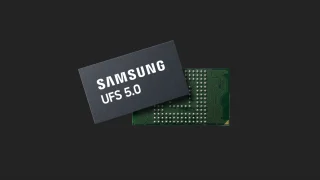
Samsung has announced the development of UFS 5.0. The brand states that UFS 5.0 is…
Jun 23, 2026
realme Philippines has officially launched the realme C100 Series, bringing two new budget smartphones with…
Jun 18, 2026WhatsApp users will now be able to edit their messages. Users who want to edit one of their WhatsApp messages can do so by long-pressing on a sent message and choosing the 'Edit' option from the menu.
Edited messages will display the label 'edited' alongside them. These edited messages, along with all the other messages, media, and calls within WhatsApp continue to be protected by end-to-end encryption.
Our coverage of how to edit whatsapp message includes: "WhatsApp messages can now be edited"; "How to activate Globe GPRS"; "Infinix HOT 70 now available with Dynamic Shine design". Each article provides unique insights and information.