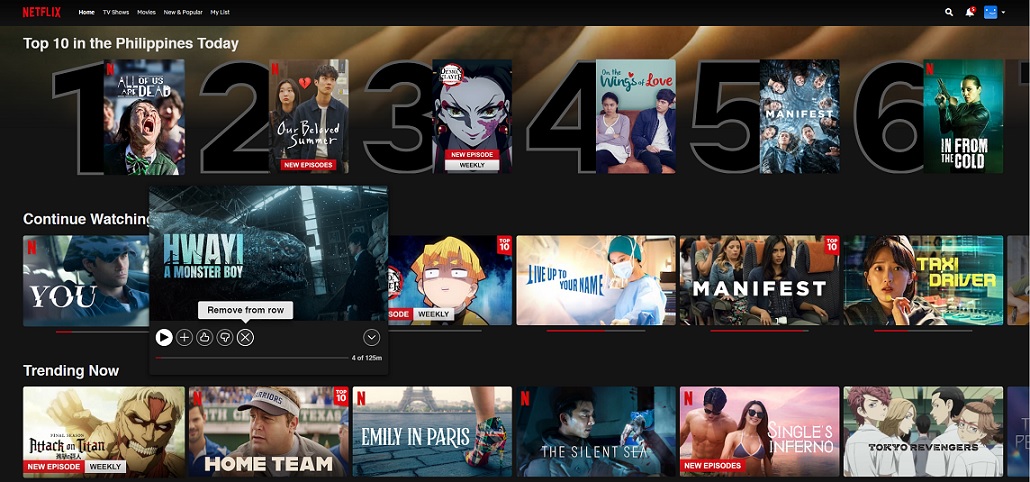

Netflix now gives its subscribers the option to delete titles from their "Continue Watching" list. In order to remove a show or movie, simply select the card in the row and scroll down to the new "Remove from Continue Watching" option to clear. Read more in our articles including "Netflix now lets you remove titles from the "Continue Watching" list" and "ReVanced removed from GitHub after DMCA complaint".
Netflix now gives its subscribers the option to delete titles from their “Continue Watching” list.…
Feb 2, 2022
The ReVanced project has been temporarily taken down from GitHub after a DMCA complaint, triggering…
Mar 31, 2026
Learn how to completely remove bloatware from your Xiaomi, POCO, or Redmi phone using a…
Mar 30, 2026
Paramount is set to acquire Warner Bros. Discovery in a deal valued at around $111…
Feb 28, 2026
Nothing has likely just confirmed the presence of a Phone (4b) in its upcoming lineup.…
Jun 22, 2026How to activate GPRS for Globe and TM (Touch Mobile) For a complete listing of…
Jun 10, 2011Netflix now gives its subscribers the option to delete titles from their "Continue Watching" list. In order to remove a show or movie, simply select the card in the row and scroll down to the new "Remove from Continue Watching" option to clear.
Our coverage of How to remove from Continue Watching Netflix includes: "Netflix now lets you remove titles from the "Continue Watching" list"; "ReVanced removed from GitHub after DMCA complaint"; "Watch: Here's how to remove bloatware on you Xiaomi / POCO / REDMI phone". Each article provides unique insights and information.
Our article "Netflix now lets you remove titles from the "Continue Watching" list" published on February 2, 2022 covers the latest information about How to remove from Continue Watching Netflix. Check it out for the most current details.