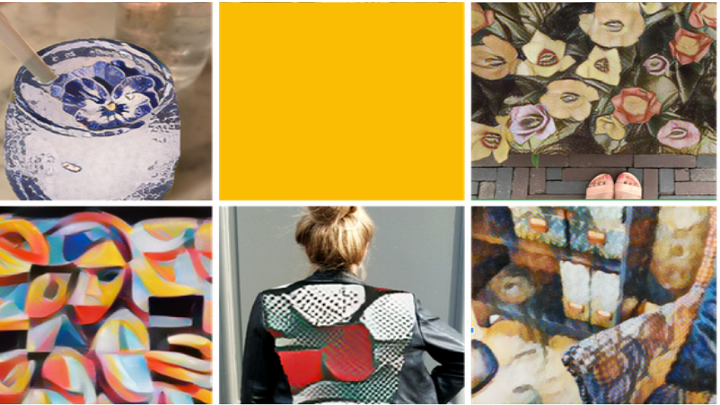

Google's Arts and Culture app, in partnership with United Kingdom's National Gallery and Japan's Museum of Art, adds a new feature that transforms your photos into the style of the world's famous artists. Powered by Google AI, the Art Transfer applies a unique algorithm that adapts the characteristics of the chosen artist's paintings and recreates the chosen images right in your mobile device. Step 1: Download the Google Arts and Culture app on iOS and Android. Read more in our articles including "Google Arts and Culture app adds Art Transfer feature" and "RCBC to remove InstaPay transfer fees on Pulz, DiskarTech".
Google’s Arts and Culture app, in partnership with United Kingdom’s National Gallery and Japan’s Museum…
Apr 3, 2020
RCBC has announced free InstaPay transfers for its digital banking apps starting July 4, 2026.…
Jul 3, 2026
Bank of the Philippine Islands (BPI) will permanently remove transfer fees for InstaPay and PESONet…
Jun 29, 2026
HUAWEI has officially launched the nova 15 Max in the Philippines, bringing the largest battery…
Jun 11, 2026
Back in March, we heard reports that Apple was looking to let the next generation…
Jun 5, 2026A new poster ad from Smart Bro promotes their broadband speed to be up to…
Oct 11, 2008Google's Arts and Culture app, in partnership with United Kingdom's National Gallery and Japan's Museum of Art, adds a new feature that transforms your photos into the style of the world's famous artists. Powered by Google AI, the Art Transfer applies a unique algorithm that adapts the characteristics of the chosen artist's paintings and recreates the chosen images right in your mobile device.
Step 1: Download the Google Arts and Culture app on iOS and Android.
Our coverage of how to use Art Transfer Google Arts and Culture includes: "Google Arts and Culture app adds Art Transfer feature"; "RCBC to remove InstaPay transfer fees on Pulz, DiskarTech"; "BPI to remove InstaPay, PESONet transfer fees starting July 1". Each article provides unique insights and information.