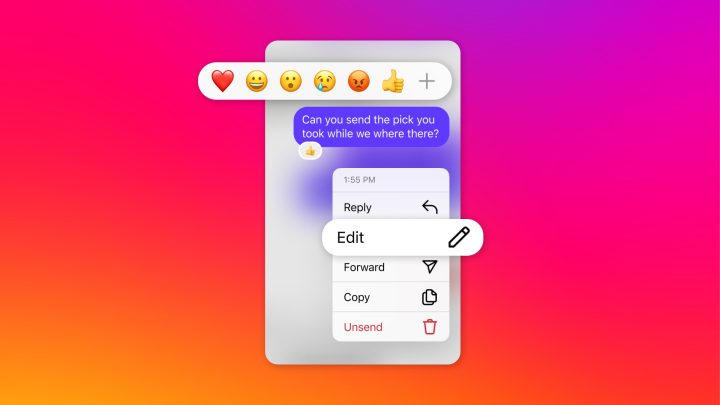

These include the ability to edit a message, pin chats, turn off read receipts, themes, and more. Edit a message Users can now edit their DMs (direct messages), but for only up to 15 minutes after sending. To edit a DM, simply press and hold a sent message then select “Edit” on the dropdown menu. Just like any other chat apps, the modified message will show the label “Edited”. Read more in our articles including "Instagram now lets you edit a message, pin chats, turn off read receipts" and "Infinix HOT 70 now available with Dynamic Shine design".

Meta has released a bunch of new updates to its Instagram’s direct messaging functionality. These…
Mar 6, 2024
After being spotted in Lazada, the Infinix HOT 70 is now available in the Philippines.…
Jun 24, 2026
Apple has released the second developer beta of iOS 27. It brings several new features…
Jun 23, 2026
Samsung has announced the development of UFS 5.0. The brand states that UFS 5.0 is…
Jun 23, 2026
realme Philippines has officially launched the realme C100 Series, bringing two new budget smartphones with…
Jun 18, 2026
Infinix has launched the Infinix HOT 70 in the Philippines. The Infinix HOT 70 is…
Jun 8, 2026These include the ability to edit a message, pin chats, turn off read receipts, themes, and more. Edit a message Users can now edit their DMs (direct messages), but for only up to 15 minutes after sending.
To edit a DM, simply press and hold a sent message then select “Edit” on the dropdown menu. Just like any other chat apps, the modified message will show the label “Edited”.
Our coverage of Instagram edit message feature includes: "Instagram now lets you edit a message, pin chats, turn off read receipts"; "Infinix HOT 70 now available with Dynamic Shine design"; "Apple rolls out iOS 27 beta 2". Each article provides unique insights and information.