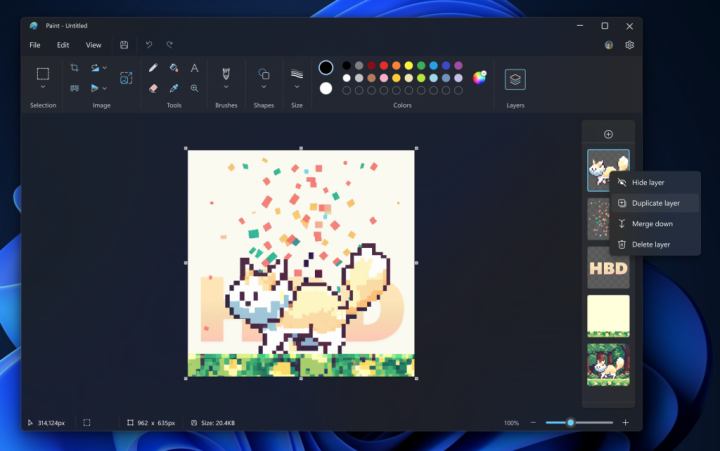

After introducing the ability to remove backgrounds with a single click, the Paint app on Windows will now be getting the ability to add layers and transparency. Both features on Paint won't be available to everyone just yet as they are currently testing it in the Canary and Dev Channels (version 11.2308.18.0 or higher) for Windows Insiders as they will soon begin rolling it out once stable after further testing. [caption id="attachment_344487" align="alignnone" width="720"] Paint with Layers[/caption] The ability to add layers will now give paint to stack shapes, text, and images on top of each other and create more complex digital art. To do so, one will need to click on the Layers button in the toolbar which will open a side panel on the canvas. This is where one may add new layers to the canvas. Users will also have the ability to show, hide, duplicate, and even merge individual layers. [caption id="attachment_344492" align="alignnone" width="930"] Paint with Transparency[/caption] Moreover, Paint will also now support transparency, including the ability to open and save transparent PNG images. To indicate a transparent image or background, Paint will show a checkerboard pattern on the canvas on the parts that are transparent. Read more in our articles including "Paint on Windows now supports layers and transparent backgrounds" and "YugaTech Christmas Gadget Guide 2014: Media Players".
After introducing the ability to remove backgrounds with a single click, the Paint app on…
Sep 24, 2023As the final installment to complete our Christmas Gadget Guide 2014, here’s a lineup of…
Dec 7, 2014
Meta launches Facebook Verified, a new free badge designed to show that a Facebook account…
Jul 25, 2026
Instagram finally lets its users replace the background music for published posts and carousels without…
Jul 22, 2026
The Bank of the Philippine Islands (BPI) has restored access to its mobile app and…
Jul 16, 2026
Telegram just released a new update that introduces a Rich Text Editor, Communities, Ephemeral Bot…
Jul 15, 2026After introducing the ability to remove backgrounds with a single click, the Paint app on Windows will now be getting the ability to add layers and transparency. Both features on Paint won't be available to everyone just yet as they are currently testing it in the Canary and Dev Channels (version 11.2308.18.0 or higher) for Windows Insiders as they will soon begin rolling it out once stable after further testing.
[caption id="attachment_344487" align="alignnone" width="720"] Paint with Layers[/caption] The ability to add layers will now give paint to stack shapes, text, and images on top of each other and create more complex digital art. To do so, one will need to click on the Layers button in the toolbar which will open a side panel on the canvas. This is where one may add new layers to the canvas.
Our coverage of paint layers includes: "Paint on Windows now supports layers and transparent backgrounds"; "YugaTech Christmas Gadget Guide 2014: Media Players"; "Meta introduces free Facebook Verified badge". Each article provides unique insights and information.