

After introducing the ability to remove backgrounds with a single click, the Paint app on Windows will now be getting the ability to add layers and transparency.
Both features on Paint won’t be available to everyone just yet as they are currently testing it in the Canary and Dev Channels (version 11.2308.18.0 or higher) for Windows Insiders as they will soon begin rolling it out once stable after further testing.
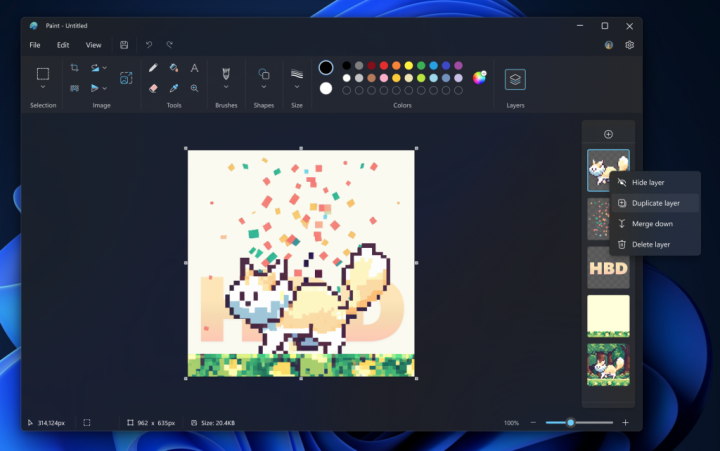
The ability to add layers will now give paint to stack shapes, text, and images on top of each other and create more complex digital art.
To do so, one will need to click on the Layers button in the toolbar which will open a side panel on the canvas. This is where one may add new layers to the canvas.
Users will also have the ability to show, hide, duplicate, and even merge individual layers.
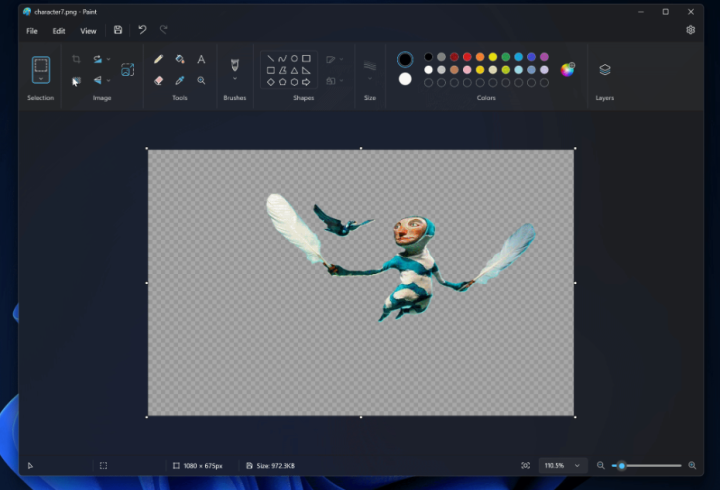
Moreover, Paint will also now support transparency, including the ability to open and save transparent PNG images.
To indicate a transparent image or background, Paint will show a checkerboard pattern on the canvas on the parts that are transparent. Previously, erasing the background or any other content would leave the space to be white instead of fully transparent.
It also works hand in hand with other layers by erasing content on one layer, it will reveal the image on other layers.






0 Comments
Leave a Reply