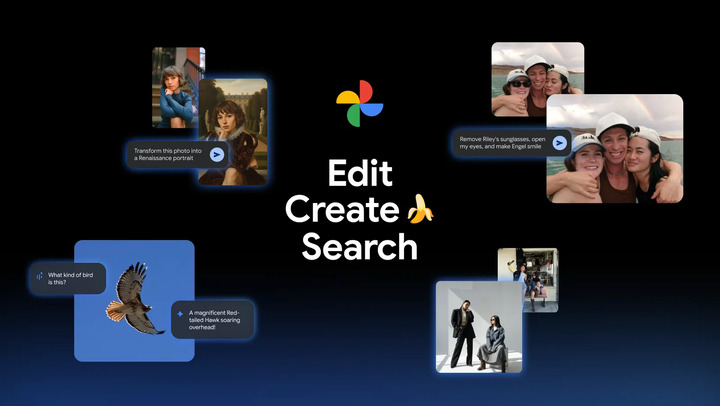

Google Photos is rolling out new AI features powered by the Google Gemini's image editing model, Nano Banana. There are new features in Google Photos that will help in editing photos. iOS users can now enjoy editing on the Google Photos app where they can now also describe what they want edited. With the brand implementing Gemini's image editing model, Nano Banana, into Google Photos, users can open the photo, tap “Help me edit”, and describe what they need to be edited. With Nano Banana, they can now describe a new style for their photos, reimagine photos and create scenarios with AI templates. Once people pick out photos or videos for a carousel, they can tap the “Multiple Captions” option on the last screen for sharing, and then drop separate text for every slide. Read more in our articles including "Google Photos rolls out new AI features" and "Instagram introduces Multiple Captions for Carousel Posts".
Google Photos is rolling out new AI features powered by the Google Gemini’s image editing…
Nov 12, 2025
Instagram has rolled out a new feature that allows creators to add unique captions to…
Jun 20, 2026
Canva has officially launched Offline Mode, allowing users to create and edit designs without an…
Jun 10, 2026
Google has announced that the Fitbit app will soon become the new Google Health app,…
May 9, 2026
Adobe just introduced new AI-powered features in Adobe Acrobat, allowing users to turn PDFs into…
May 6, 2026
Samsung Electronics Philippines and Cignal have announced a partnership to make Cignal’s content available on…
Apr 19, 2026Google Photos is rolling out new AI features powered by the Google Gemini's image editing model, Nano Banana. There are new features in Google Photos that will help in editing photos.
iOS users can now enjoy editing on the Google Photos app where they can now also describe what they want edited. With the brand implementing Gemini's image editing model, Nano Banana, into Google Photos, users can open the photo, tap “Help me edit”, and describe what they need to be edited. With Nano Banana, they can now describe a new style for their photos, reimagine photos and create scenarios with AI templates.
Our coverage of Photo organization AI includes: "Google Photos rolls out new AI features"; "Instagram introduces Multiple Captions for Carousel Posts"; "Canva rolls out Offline Mode for uninterrupted Content Creation". Each article provides unique insights and information.