
How to activate Smart GPRS or TNT (Talk N Text) Welcome to the Smart GPRS or 3G tutorial page. It will also show you how to hook up your PC or laptop to any Smart 3G-enabled phone: Download Smart GPRS settings: Step 1: Using your 3G handset, go to Tools > Settings > Network Mode > select Dual Mode. To download SMART GPRS phone settings: Key in SET GPRS and send to 211. Example: If you have a Nokia 6230, that's “SET MMS N6230†Setting up of MMS and GPRS handsets: To download SMART MMS phone settings, key in SET MMS and send to 211. To download SMART GPRS phone settings, key in SET GPRS and send to 211. Activating SMART MMS and GPRS: To activate SMART GPRS, key in GPRS ON and send to 333. Activation of MMS and GPRS will require a confirmation message from SMART. Activation of MMS and GPRS will require a confirmation message from Smart. Read more in our articles including "How to activate Smart GPRS" and "TCL NXTPAPER 60 Ultra, NXTPAPER 70 Pro now official, specs and price in the Philippines".
How to activate Smart GPRS or TNT (Talk N Text) Welcome to the Smart GPRS…
Jun 10, 2011
TCL has officially launched the NXTPAPER 60 Ultra and NXTPAPER 70 Pro in the Philippines,…
Aug 8, 2026
Samsung has unveiled the ISOCELL HPC, a new 200MP mobile image sensor designed to improve…
Aug 8, 2026
The Bangko Sentral ng Pilipinas (BSP) is proposing to require banks, e-wallet providers, digital lenders,…
Aug 8, 2026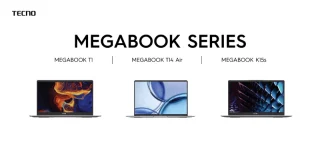
TECNO has officially launched three new MEGABOOK laptops in the Philippines, expanding its local lineup…
Aug 8, 2026A new poster ad from Smart Bro promotes their broadband speed to be up to…
Oct 11, 2008How to activate Smart GPRS or TNT (Talk N Text) Welcome to the Smart GPRS or 3G tutorial page. It will also show you how to hook up your PC or laptop to any Smart 3G-enabled phone: Download Smart GPRS settings: Step 1: Using your 3G handset, go to Tools > Settings > Network Mode > select Dual Mode.
To download SMART GPRS phone settings: Key in SET GPRS and send to 211. Example: If you have a Nokia 6230, that's “SET MMS N6230†Setting up of MMS and GPRS handsets: To download SMART MMS phone settings, key in SET MMS and send to 211. To download SMART GPRS phone settings, key in SET GPRS and send to 211.
Our coverage of smart gprs activation includes: "How to activate Smart GPRS"; "TCL NXTPAPER 60 Ultra, NXTPAPER 70 Pro now official, specs and price in the Philippines"; "Samsung unveils ISOCELL HPC 200MPsensor". Each article provides unique insights and information.