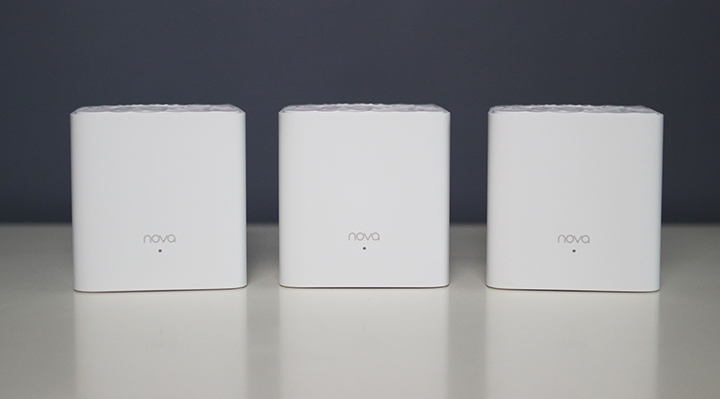

Tenda, a popular modem and router, is offering an inexpensive way to boost your WiFi signal and remove dead spots at your home: the Nova MW3. Set up Setting up the Tenda Nova MW3 was a breeze. First, download the Tenda app from the App Store or Play Store. Run the Tenda app and log in using your Google, Facebook, or Twitter account, then change the SSID and password to your choice. Features Surprisingly, the Tenda Nova MW3 has a lot of network customization and features. You can make network changes on the Tenda app, which is more convenient than going to your router's default gateway. Parental Controls Using the parental controls on the Tenda app, users may create groups, assign devices to each group, and set periods of inaccessibility for devices within the group. Smart QoS By setting how much bandwidth your ISP can output, the Tenda Nova MW3 can intelligently allocate the bandwidth to the user's need, ensuring uninterrupted streaming, or low ping when gaming. Read more in our articles including "Tenda Nova MW3 Review" and "TECNO POVA Curve 2 5G Review".

Do you find yourself not getting enough WiFi coverage in your house? Tenda, a popular…
Nov 10, 2019
These days, it’s not hard to find a smartphone with a large battery or a…
Jun 19, 2026
The realme C100 is out, and it’s got to be the most affordable smartphone packing…
Jun 18, 2026
There are plenty of gaming keyboards on the market today, but every now and then,…
Jun 18, 2026
Tablets have become a popular choice for those who want a bigger screen without carrying…
Jun 14, 2026
Tenda, a popular modem and router, is offering an inexpensive way to boost your WiFi signal and remove dead spots at your home: the Nova MW3. Set up Setting up the Tenda Nova MW3 was a breeze.
First, download the Tenda app from the App Store or Play Store. Run the Tenda app and log in using your Google, Facebook, or Twitter account, then change the SSID and password to your choice. Features Surprisingly, the Tenda Nova MW3 has a lot of network customization and features.
Our coverage of Tenda includes: "Tenda Nova MW3 Review"; "TECNO POVA Curve 2 5G Review"; "realme C100 Review". Each article provides unique insights and information.