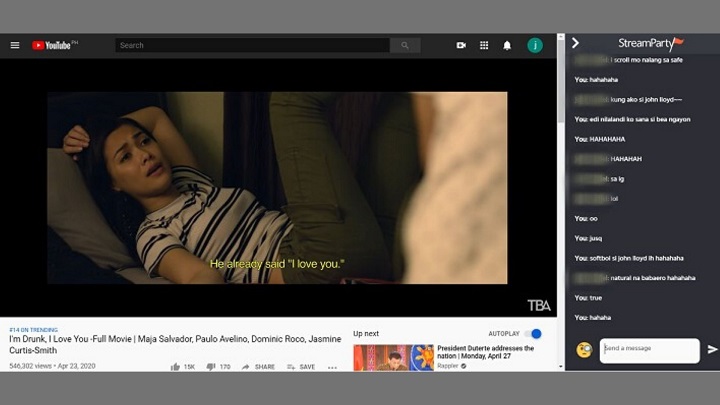

Just like the tool being used in Netflix Party, the StreamParty is a web browser extension that allows people to experience synchronized video playback and live chat on their PCs or laptops for free. Unlike any other extensions, this one doesn't require people to have a paid premium subscription to YouTube. The beta test is currently open for Chrome and Firefox users, but future updates will include compatibility with other web browsers such as Opera and Brave. Step 2: Click 'Join Beta.' You'll be redirected to the Chrome Web Store of the extension. If you're going to use Netflix and Disney+, make sure to log-in first through the web browser before using it. Do note that they could only join the room once they installed the extension on their Chrome browsers and clicked the StreamParty icon. These browsers allowed videos to continue playing even when the screen was locked or when switching apps — a feature meant to be exclusive to YouTube Premium. While some non-Premium users may have previously been able to access this through mobile web browsers in certain scenarios, we have updated the experience to ensure consistency across all our platforms,” Google said in a statement. Read more in our articles including "How to Watch Movies With Friends on YouTube" and "Google closes browser loopholes for YouTube background playback".
Various local production houses have started to roll out good independent films on their YouTube…
Apr 28, 2020
Google has officially confirmed that it is closing long-standing loopholes that allowed users to play…
Feb 1, 2026I’ve been a fan of the Flock browser ever since I discovered it years back.…
Jun 23, 2010Every once in a while, I’d receive text messages or emails from bloggers and website…
Jun 7, 2007
It’s that time again when we round up the latest smartphone launches here in the…
Jun 26, 2026
A new school year means new projects, research papers, presentations, and online learning tasks. Whether…
Jun 14, 2026Just like the tool being used in Netflix Party, the StreamParty is a web browser extension that allows people to experience synchronized video playback and live chat on their PCs or laptops for free. Unlike any other extensions, this one doesn't require people to have a paid premium subscription to YouTube.
The beta test is currently open for Chrome and Firefox users, but future updates will include compatibility with other web browsers such as Opera and Brave. Step 2: Click 'Join Beta.' You'll be redirected to the Chrome Web Store of the extension. If you're going to use Netflix and Disney+, make sure to log-in first through the web browser before using it.
Our coverage of web browser extension YouTube includes: "How to Watch Movies With Friends on YouTube"; "Google closes browser loopholes for YouTube background playback"; "New Flock beta leaves Firefox for Chrome". Each article provides unique insights and information.