

WhatsApp officially extends its end-to-end encryption (EE2E) for chat histories saved in Google Drive or iCloud. In its mission to provide a safe and secure platform for its 1 billion users, WhatsApp is now rolling out its EE2E for chat histories. WhatsApp users can secure their EE2E backups with a personally generated password and 64-digit encryption key. Neither of which will be accessible to WhatsApp or the backup service. • Once the password is verified, the Backup Key Vault will send the encryption key back to the WhatsApp client. • With the key in hand, the WhatsApp client can then decrypt the backups. Additionally, these prior steps must be followed to enable EE2E for backups in WhatsApp: • Open Settings. •Tap Done, and wait for WhatsApp to prepare your end-to-end encrypted backup. Read more in our articles including "WhatsApp rolls out end-to-end encrypted backups for Android and iOS" and "WhatsApp for desktop now available for download".

WhatsApp officially extends its end-to-end encryption (EE2E) for chat histories saved in Google Drive or…
Oct 15, 2021Facebook-owned cross-platform instant messaging client, WhatsApp, has announced WhatsApp Web – the desktop version of…
May 11, 2016Just this evening, the server that this blog is on had a weird hardware failure.…
Dec 1, 2008
Meta launches Facebook Verified, a new free badge designed to show that a Facebook account…
Jul 25, 2026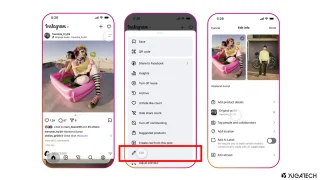
Instagram finally lets its users replace the background music for published posts and carousels without…
Jul 22, 2026
The Bank of the Philippine Islands (BPI) has restored access to its mobile app and…
Jul 16, 2026WhatsApp officially extends its end-to-end encryption (EE2E) for chat histories saved in Google Drive or iCloud. In its mission to provide a safe and secure platform for its 1 billion users, WhatsApp is now rolling out its EE2E for chat histories.
WhatsApp users can secure their EE2E backups with a personally generated password and 64-digit encryption key. Neither of which will be accessible to WhatsApp or the backup service. • Once the password is verified, the Backup Key Vault will send the encryption key back to the WhatsApp client.
Our coverage of WhatsApp EE2E backup includes: "WhatsApp rolls out end-to-end encrypted backups for Android and iOS"; "WhatsApp for desktop now available for download"; "Do you make local backups of your blog?". Each article provides unique insights and information.