
Not all branches of said establishments accept reloading of Beep cards but those in close proximity to train stations are open for services. To reload via ShopeePay, follow these steps: Simply open your Shopee app and tap “Load, Bills & Travel.” Under the Travel category, choose “BEEP CARD.” Enter the 16-digit number found at the back of the beep™ card you want to reload and select the Top Up amount. Read more in our articles including "Beep card gets more reloading stations through Tambunting, Villarica & SM Bills Payment" and "ShopeePay now supports beep card reload".
At last, another improvement of service for the growing unified ticketing system as Beep card…
Jun 8, 2016
ShopeePay has recently partnered with beep operator to allow cardholders and commuters more options to…
Oct 10, 2022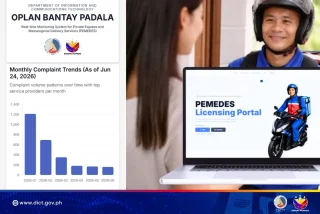
The Department of Information and Communications Technology (DICT) reported a significant decline in courier-related complaints,…
Jun 25, 2026
The top model in the lineup is the ROG Zephyrus Duo GX651AX, described by ASUS…
Jun 25, 2026
The most popular mode of privately listening to your tunes nowadays is through wired earphones.…
Aug 25, 2016AF Payments Inc. have just announced that BGC Buses are now also using the beep™…
Jun 16, 2016Not all branches of said establishments accept reloading of Beep cards but those in close proximity to train stations are open for services. To reload via ShopeePay, follow these steps: Simply open your Shopee app and tap “Load, Bills & Travel.” Under the Travel category, choose “BEEP CARD.” Enter the 16-digit number found at the back of the beep™ card you want to reload and select the Top Up amount.
Our coverage of where to reload beep includes: "Beep card gets more reloading stations through Tambunting, Villarica & SM Bills Payment"; "ShopeePay now supports beep card reload"; "Courier Complaints Drop 88% Under Oplan Bantay Padala". Each article provides unique insights and information.
Our article "Beep card gets more reloading stations through Tambunting, Villarica & SM Bills Payment" published on June 8, 2016 covers the latest information about where to reload beep. Check it out for the most current details.