
ShopeePay has recently partnered with beep operator to allow cardholders and commuters more options to top-up their cards.

Present in the signing ceremony are Martin Yu, Director of Shopee Philippines; Jonathan Juan Moreno, President & CEO of AF Payments Inc.; and Sharon Fong, Chief Commercial Officer of AF Payments Inc.
To reload via ShopeePay, follow these steps:
- Simply open your Shopee app and tap “Load, Bills & Travel.”
- Under the Travel category, choose “BEEP CARD.”
- Enter the 16-digit number found at the back of the beep™ card you want to reload and select the Top Up amount. Available denominations include P20, P50, P100, P200, P300, P500, and P1,000. A minimal convenience fee is added for every transaction.
- Tap Checkout
- Choose ShopeePay as payment option, then tap “Pay Now” and enter your ShopeePay PIN.
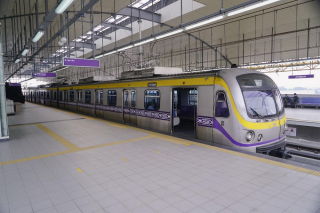
- To complete the process, fetch your load by tapping your beep™ card at any E-load Station located in LRT-1, LRT-2, and MRT-3, and select P2P Bus Terminals.
“Our priority has always been to provide convenience to passengers. By partnering with a leading e-commerce platform like Shopee, which is widely used by Filipinos for online shopping, we aim to offer flexibility and consistently add value for our users so they keep using their card. Rest assured that beep™ will continue to grow our network of partners to provide the best service to the riding public and Filipino consumers in general,” said Sharon Fong, Chief Commercial Officer of AF Payments Inc.
“Since we launched ShopeePay, our mission has always been to provide access to safe, reliable, and convenient digital payments for Filipinos. With our landmark partnership with beep™, we are able to extend this service as well as the rewards our users love and enjoy to beep™ cardholders as well.” said Martin Yu, Director of Shopee Philippines.



0 Comments
Leave a Reply