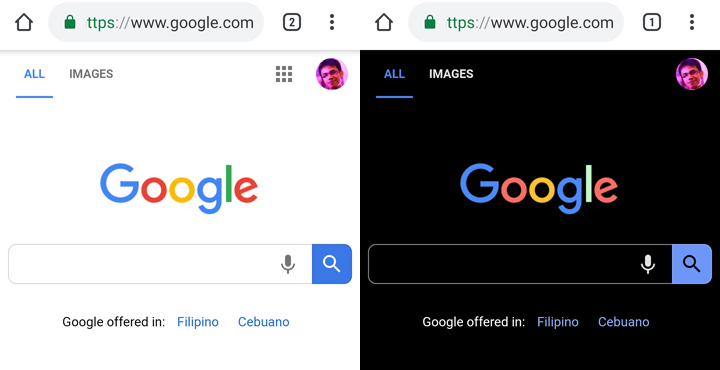

Google has silently implemented the Dark Mode feature for its Chrome browser in Android. Press on the "default" option on the Android Web Contents dark mode and Android Chrome UI dark mode and choose "Enabled" Restart the Chrome app and you'll be greeted with a dark interface. You will still know the difference of the dark mode and the Incognito mode of the browser as the latter have a Gray-colored background while the former has a pitch black color. Read more in our articles including "You can now enable Dark Mode for Google Chrome in Android" and "Canva rolls out Offline Mode for uninterrupted Content Creation".

Google has silently implemented the Dark Mode feature for its Chrome browser in Android. Read…
Apr 28, 2019
Canva has officially launched Offline Mode, allowing users to create and edit designs without an…
Jun 10, 2026
Apple did not build its new AI alone. At WWDC 2026, the company confirmed it…
Jun 9, 2026
Google has started rolling out a redesigned Google Wallet app for Android alongside new Google…
May 24, 2026
Google has announced Android Halo. Android Halo is a new feature that shows what your…
May 20, 2026Bumped into Art Samaniego of Manila Bulletin during the Nokia N82 Adventure II launch this…
Mar 14, 2008Google has silently implemented the Dark Mode feature for its Chrome browser in Android. Press on the "default" option on the Android Web Contents dark mode and Android Chrome UI dark mode and choose "Enabled" Restart the Chrome app and you'll be greeted with a dark interface.
You will still know the difference of the dark mode and the Incognito mode of the browser as the latter have a Gray-colored background while the former has a pitch black color.
Our coverage of You can now enable Google Chrome's Dark Mode for Android includes: "You can now enable Dark Mode for Google Chrome in Android"; "Canva rolls out Offline Mode for uninterrupted Content Creation"; "Apple Built Its New AI Foundation Models With Google". Each article provides unique insights and information.