

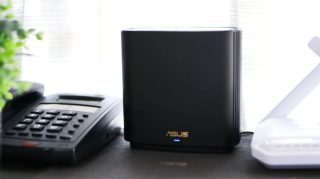
So, PLDT Home sent us the ZenWiFi AX6600 (XT8) to test and see how it performs. The ZenWiFi XT8 looks similar to the XD6 we did a hands-on last year. PLDT is offering the XT8 as a WiFi 6 mesh system for enthusiasts given its features but setting it up is pretty much simple. Take one of the XT8 routers, plug it into a power source, and connect it to the LAN1 port of your PLDT modem using the LAN cable included in the package. For the second XT8 modem, plug it into a power source as well but no need to connect it via LAN. Next, you will need to install the ASUS Router app then select 'Set up a new router', then choose the ZenWiFi series it belongs to, then follow the rest of the instructions. You can now move the second XT8 router to another room or area where there are dead spots. When it comes to performance, the XT8 is better than the XD6. Read more in our articles including "ASUS ZenWiFi AX6600 (XT8) Mesh WiFi System Hands-on" and "PLDT Home Fibr now offers ASUS ZenWiFi XT8 WiFi 6 Mesh System".
Last month, we wrote about PLDT’s Home WiFi Mesh offerings. Those were WiFi 5, though,…
Sep 5, 2022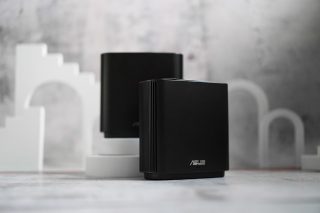
PLDT has announced that it now offers the ASUS ZenWiFi XT8 WiFi 6 Mesh System…
Jul 20, 2021
AOC launches a 13.3-inch portable monitor that uses a color E Ink Kaleido 3 display…
Jul 15, 2026
With Apple releasing its latest desktop operating system macOS 27 Golden Gate, there is much…
Jun 22, 2026
GIGABYTE’s flagship AORUS GeForce RTX 5090 Infinity graphics card is now available in the Philippines…
Jun 17, 2026
AMD has announced the Radeon RX 9070 GRE. The Radeon RX 9070 GRE is a…
Jun 9, 2026So, PLDT Home sent us the ZenWiFi AX6600 (XT8) to test and see how it performs. The ZenWiFi XT8 looks similar to the XD6 we did a hands-on last year.
PLDT is offering the XT8 as a WiFi 6 mesh system for enthusiasts given its features but setting it up is pretty much simple. Take one of the XT8 routers, plug it into a power source, and connect it to the LAN1 port of your PLDT modem using the LAN cable included in the package. For the second XT8 modem, plug it into a power source as well but no need to connect it via LAN.
Our coverage of zenwifi xt8 includes: "ASUS ZenWiFi AX6600 (XT8) Mesh WiFi System Hands-on"; "PLDT Home Fibr now offers ASUS ZenWiFi XT8 WiFi 6 Mesh System"; "AOC launches 13.3-inch Color E Ink Monitor". Each article provides unique insights and information.