
Note-taking apps have become popular because of their ability to make us more efficient, especially for students who prefer taking notes digitally. Say goodbye to dull and boring notes app because we listed all the note-taking apps where you can spice it up with some doodles and sketches.
OneNote

OneNote is a free cross-platform note-taking app from Microsoft, and it’s available on pretty much every smartphone and tablet. It provides more formatting options and a higher editing spectrum. All data is saved to the cloud and synced with other devices via a free Microsoft account, which most students already have for using OneDrive, Office, Outlook, or even an Xbox One gaming console.
Apple Notes

Notes is Apple’s first-party note app that’s heavily integrated into the iOS operating system used on the iPhone and iPad. Notes support drawing with your finger on any iPhone and iPad and with the Apple Pencil when used on either an iPad Pro or an iPad (6th generation and up). This feature can be useful for writing notes in lectures or sketching objects when on a field trip.
Microsoft Whiteboard
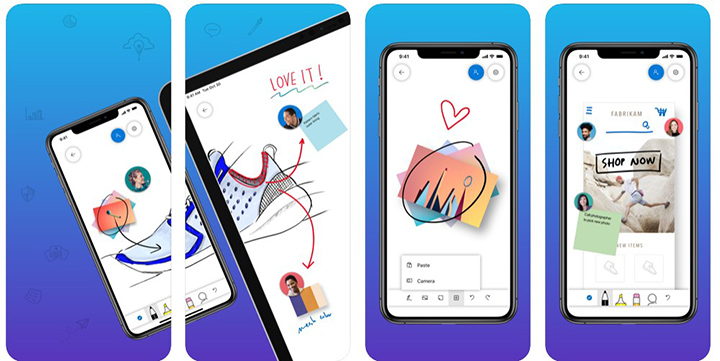
Microsoft Whiteboard is a rather innovative app that aims to replace a traditional physical whiteboard. This is perfect for a group of students. You can draw or write on the digital whiteboard within the app, and everyone else who has access to that particular whiteboard can see the changes being made in real-time. They can also make their edits, which can be seen by others.
Concepts

Concepts is a next-generation power tool for sketching, design, and illustrating from anywhere. There’s a stunning array of drawing tools, color wheels that complement the note-taking experience — pencils, ball-points, and fountain pens are all on offer and aim to replicate the feel of good old fashioned pen and paper.
Inkflow Visual Notebook

Inkflow works like a Word Processor for Visual Thinking. Capture your ideas as easily as with pen and paper, then arrange and reorganize them with your fingers. Inkflow’s ink feels like a smooth fountain pen. You can insert text boxes and photos anywhere on the page and resize them seamlessly with the ink. You can also choose from a selection of different paper backgrounds.
Paper by WeTransfer
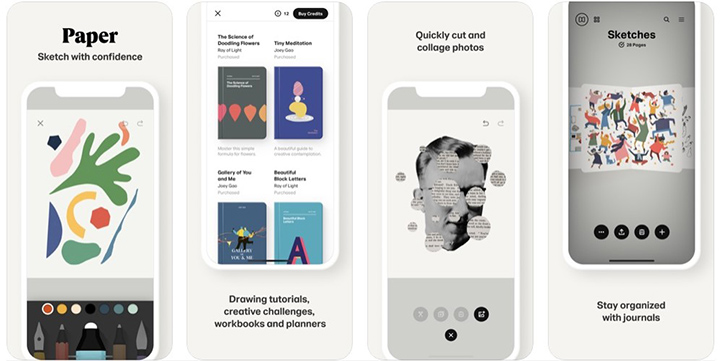
The intuitive design makes this easy for anyone to use. The drawing tool is excellent for sketching out ideas. The app is designed to look and feel just like picking up a notebook. In keeping with this clean aesthetic, you won’t find any buttons or login screens. Multiple sketchbooks can be added to each device, allowing students to share a device.
Apps listed above are best used with the Apple Pencil or any stylus that is compatible with your device for a more immersive experience. And that’s it, how about you? What note-taking apps do you use for your online classes? Let us know in the comments.






0 Comments
Leave a Reply