
BDO Pay is an everyday payment app where you can scan, send, and pay almost anywhere without having to cash in. You can choose to pay from your linked BDO accounts, from savings to checking to credit cards. They now offer zero convenience fees for Autosweep and Easytrip.
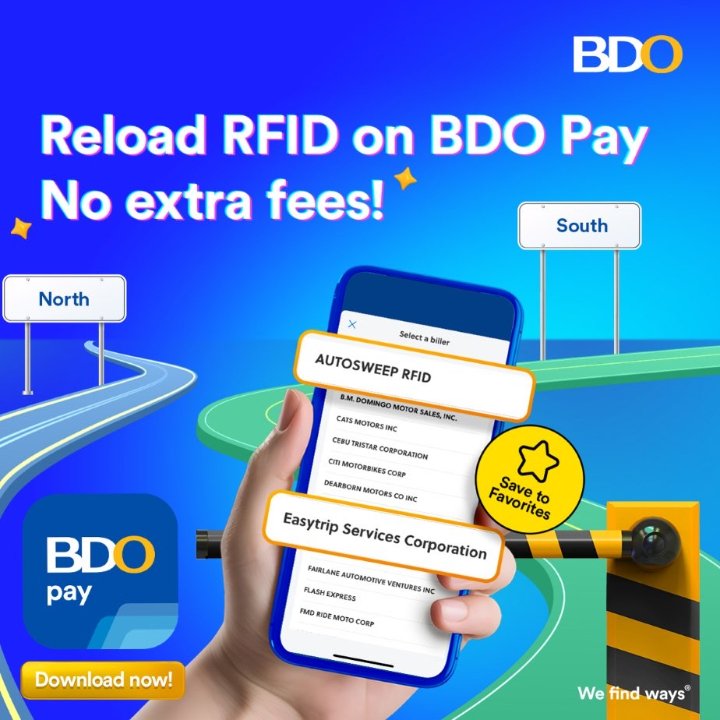
BDO Pay is a payment app that does not need to cash in and has zero convenience fees. Simply select Pay Bills on the BDO Pay home screen. Then pick Transportation, and scroll down to choose Autosweep RFID or Easytrip RFID.
In the next page, key in your account number and subscriber account name, plus the amount you wish to load. Choose the account you want to pay from, then click Pay and you are done. Autosweep transactions load instantly, while Easytrip posts in real time if done before 10:00 pm.
For an even faster transaction for the next time, save as Favorite and keep the taps to a minimum. Save every time you pay. Reloading your RFID accounts is now cheaper and easier, thanks to BDO Pay.
Enjoy zero convenience fees via BDO Pay with more than just your RFID accounts. Choose from over 2,100 billers which you can pay with your BDO account anytime, anywhere. The list includes electric utilities, government agencies, insurance companies, schools, and even charities.
Users who are new to BDO Pay can start having zero fees and no cash in when you download the app from the App Store, Google Play Store, or AppGallery. No need to register: simply log in using your BDO Online username and password. Once logged in, link your BDO bank account and/or credit cards to begin paying with the app.
If you have at least one BDO account or credit card but have not enrolled in Online Banking yet, you can create your BDO Online account and use your login details to sign up for BDO Pay. You can select Credit Card only if you don’t have an existing BDO Savings or Checking Account to use the app.
Need help? You can access both online and offline customer assistance channels via www.bdo.com.ph, 24/7 hotline (+632) 8888-0000, or drop by at any of BDO’s 1,200 branches nationwide nearest you.


0 Comments
Leave a Reply