

Microsoft has started rolling out an upgraded Android app mirroring experience on Windows 11, allowing users to view Android apps using nearly the entire desktop screen through the Phone Link app. The new feature, called Expanded screen, lets Android apps take up around 90% of the display, moving beyond the previously limited phone-sized portrait view.

Expanded screen support is included in Phone Link version 1.25112.36.0 and is now available to all users with supported Android devices. Once enabled, Phone Link prompts the connected phone to relaunch the selected Android app in a wider layout, which is then streamed to the PC. This mimics tablet-style behavior, though Microsoft notes that some apps may need to restart to adapt to the new layout, while others may not support expanded views at all.
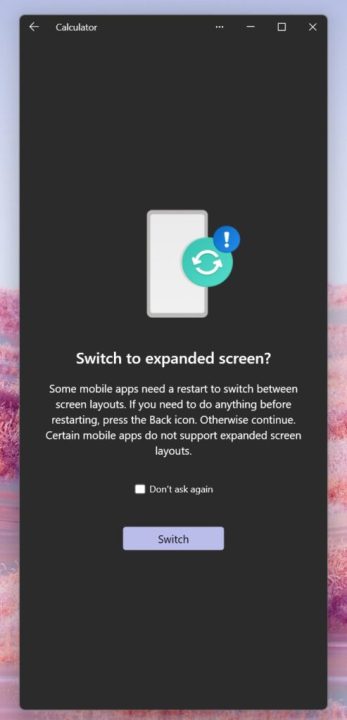
The feature was previously limited to Windows Insiders, but Microsoft has now made it broadly available via the Microsoft Store. While the experience isn’t fully edge-to-edge yet, leaving a small portion of the desktop unused, it significantly improves multitasking for users who rely on Android apps alongside Windows workflows.

Expanded screen works with select devices from brands such as Samsung, HONOR, OPPO, ASUS, vivo, OnePlus, Realme, and Xiaomi that support Link to Windows. Phones running Android 11 or newer may also qualify for multi-app streaming, depending on hardware support.
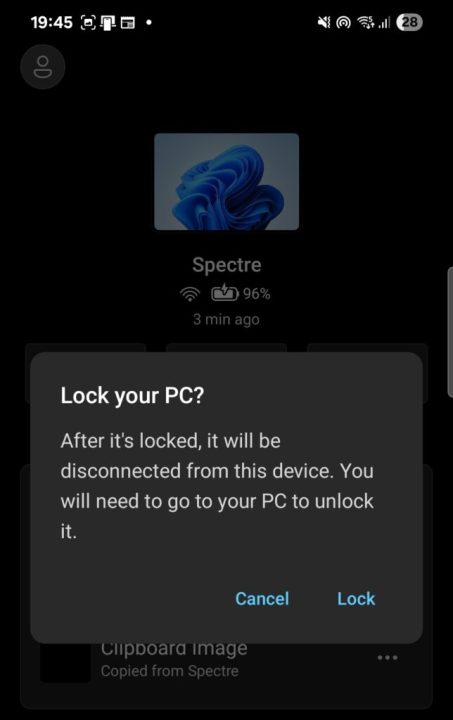
Alongside this update, Microsoft has also introduced other Phone Link enhancements, including the ability to lock a Windows PC remotely from an Android phone, improved file sharing, and background clipboard syncing across devices.

0 Comments
Leave a Reply