

Google has started rolling out Android’s new Desktop Mode for Pixel phones, allowing users to connect their device to an external monitor and use it like a desktop computer.
The feature arrives as part of the March Pixel Drop update. With a USB-C cable, Pixel users can connect their phone to a compatible monitor and get a desktop-style interface on a larger screen.
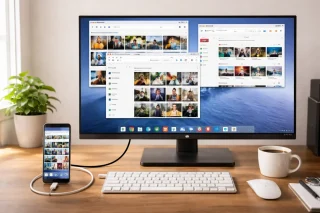
In Desktop Mode, apps can open in multiple windows, similar to how they work on a laptop or PC. The screen also shows a desktop layout with a dock for apps. The apps are the same ones already installed on the phone but adjusted to fit a bigger display.
The feature also supports wired and wireless keyboards and mouse. Other accessories such as wired internet and external storage devices can also be connected, allowing users to work or browse more easily on a larger screen.
Desktop Mode is available on Pixel 8 devices and newer models, including foldable Pixel phones, as long as they support USB DisplayPort. Users will also need a monitor that supports DisplayPort through USB-C. If the monitor does not support it, a USB-C to HDMI adapter can be used.
Google first tested the feature through beta versions of Android before releasing it to more users. The company said the update is starting to roll out now and should become available to supported Pixel devices soon.


0 Comments
Leave a Reply