

Google は、Pixel 携帯電話向けの Android の新しいデスクトップモードの展開を開始しました。これにより、ユーザーはデバイスを外部モニターに接続し、デスクトップコンピュータのように使用できます。
The feature arrives as part of the March Pixel Drop update. With a USB-C cable, Pixel users can connect their phone to a compatible monitor and get a desktop-style interface on a larger screen.
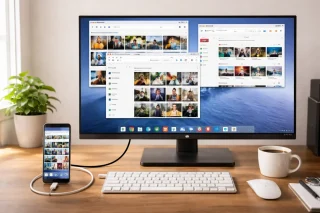
デスクトップモードでは、アプリはラップトップや PC と同様に複数のウィンドウで開くことができます。画面にはアプリ用のドックがあるデスクトップレイアウトが表示されます。アプリは、電話に既にインストールされているものと同じですが、より大きなディスプレイに合わせて調整されています。
この機能は有線・無線のキーボードとマウスもサポートしています。 有線インターネットや外付けストレージデバイスなどの他のアクセサリも接続でき、ユーザーは大画面でより快適に作業や閲覧ができます。
デスクトップモードは、Pixel 8 デバイス以降のモデル、折りたたみ式 Pixel 携帯電話を含む、USB DisplayPort に対応している限り利用できます。ユーザーは USB-C 経由で DisplayPort をサポートするモニターも必要です。モニターが対応していない場合は、USB-C から HDMI へのアダプターを使用できます。
Google は Android のベータ版で機能を最初にテストし、その後より多くのユーザーにリリースしました。同社は、アップデートは現在展開を開始しており、まもなく対応するPixelデバイスで利用可能になると述べました。



0 Comments
Leave a Reply